AgentsOpenClaw
Get a shareable link for what OpenClaw makes
Add the host0 skill to your Gateway and message your agent from any channel. It runs one deploy through exec and replies with a URL that only you can open until you share it. We've read OpenClaw's docs but haven't run this ourselves, so treat it as what should happen.
Looking for somewhere to run OpenClaw? host0 can't do that: it serves files and shared records, and no long-running process of yours runs on it. The first question below points to what OpenClaw's docs suggest instead.
Free plan, no card. Pro is $9 a month.
Who can open what you publish
It doesn't matter which channel you asked from: a new deploy is private to the host0 account whose key is on the Gateway. Being in the group where it was requested gives nobody access. Reply in the thread to change that: "make it a link anyone can open" or "invite sam@acme.com".
- Private: the default. You and people you invite by email, each signing in as themselves.
- Anyone with the link: no sign-in, unlisted and never indexed.
- Public on the web: no sign-in, and search engines may index it.
Access
- No one yet. Add an address and watch the visitor's window.
Sign in to view Team todos
This app is private — sign in to check your access.
Continue with Googleyou@company.comContinueNothing is served until they sign in, and only people you've invited get past that.
x-robots-tag: noindex, nofollow, noarchiveWays to connect OpenClaw
| Route | What it can do | Set it up |
|---|---|---|
Skill: Install it on the machine running the Gateway, not on your phone. The first command puts it in the active workspace, the second in ~/.openclaw/skills for every local agent. The setup prompt above also works when pasted into a chat, but it only loads the skill for that conversation. Best for: Anything you'll publish more than once | What it can do: Deploys, Manages | ~/.openclaw/skills/host0 |
host0 CLI: The agent runs this through exec, with nothing installed. A normal OpenClaw install already has a newer Node than the 18.18 this needs. Without the skill, you have to tell the agent to use it. Best for: A one-off from an agent with no skills allowed | What it can do: Deploys, Manages | |
| MCP server: Save the server, then sign in. If Settings → MCP in the Control UI offers Sign in, use that and keep the Gateway running. Otherwise OpenClaw's terminal login needs the Gateway stopped, as below. Best for: An agent with no shell that still manages apps | What it can do: Can't deploy, Manages | |
Browser drop: Ask OpenClaw to send you the file in chat, save it, and drop it on host0. It needs no skill and no exec. You sign in with an email code or Google. Best for: Agents limited to messaging tools | What it can do: Deploys, Dashboard to manage |
Can host0 host OpenClaw itself?
No. The OpenClaw Gateway is a process that stays running, and host0 has nowhere to run one. If you came here for a place to run your agent, you need a server, and this page won't help with that part.
OpenClaw's own hosting docs are the place to start. They cover a Linux VPS at DigitalOcean, Hetzner, Hostinger or Oracle Cloud, browser setups on Railway and Northflank, Fly.io, Render, Azure, GCP, a Raspberry Pi, and an experimental Cloudflare template. Your own laptop counts too.
host0 is for the step after that. Wherever the agent runs, it ends up making a page, a report or a small app, and those need an address other people can open. Your Gateway can stay on loopback behind an SSH tunnel or Tailscale, as OpenClaw recommends, because visitors never reach it.
Can't OpenClaw just send me the file?
Yes, and when the reader is already in that chat, an attachment is the simpler choice. A link starts to matter when the reader isn't in the chat, when the thing is a whole site rather than one file, or when people need to write to it.
| Attachment in chat | host0 link | |
|---|---|---|
| Who can open it | People in that conversation | People you invite by email, anyone with the link, or the whole web |
| What fits | One file at a time. OpenClaw's WhatsApp caps are 100 MB for documents and 16 MB for video | A folder of pages and assets, or an app. On Free, up to 3 MB a file |
| After a change | Send a new file, and the old one stays in the thread | Same URL, new version |
| People writing to it | No | Yes, with shared data from an h0.json |
| Where it lives | With the chat app you sent it through | On host0's servers, not your machine |
The Control UI has a middle option: message with a local HTML path saves a snapshot as an attachment in that conversation. It has to be self-contained, because relative assets aren't bundled. Tailscale Funnel isn't a shortcut either. OpenClaw uses it to put the Gateway dashboard online behind a shared password, not your files.
There's also a reason to skip host0 altogether. OpenClaw's pitch is no hosted service in the middle, and host0 is a hosted service: whatever you publish, shared data included, leaves your hardware. If it mustn't, stick to attachments or serve it from a web server you run.
What happens when I ask from Telegram or WhatsApp?
Your message reaches the Gateway, the agent runs the deploy through exec on that host, and the URL comes back as its reply in the same thread. This should work on any channel, but we haven't tried it on one.
- The command runs where
execruns: the Gateway host unlesstools.exec.hostsends it to a paired node. The folder and the saved key must be on that machine. - On default settings,
execon the Gateway has no approval prompt, so nothing asks before a deploy. Stricter modes do, with native approval cards where the channel has them and/approvewhere it doesn't. - With no key yet, the first deploy prints a link and a short code. Open the link in your own browser and approve. You don't need access to the server, and no personal details pass through the chat.
- OpenClaw hides tool progress in chat by default, so the link might not arrive until the agent's turn ends, up to 90 seconds later. If so, approve it and reply that you have. The agent runs the same command again and carries on. The code lasts 10 minutes.
To be sure the skill gets used, name it. $host0 publish the report folder works for authorized senders on every channel, and /host0 is the standalone command form.
Why can't my agent run the deploy?
Most often exec isn't available to that agent or session. A skill is only instructions and grants no tools, so an agent can know exactly how to publish and still have no way to run the command.
| What you see | Likely cause | What to change |
|---|---|---|
| It says it can't run commands | The messaging or minimal tool profile, neither of which includes exec | Move that agent to the coding profile |
| Fine in a DM, refused in a group | That group's tools or toolsBySender denies exec, or mode: "non-main" sandboxes groups | Publish from the DM, or allow it for your sender id |
| A denial, or a prompt that never arrives | tools.exec.mode is deny, allowlist or ask. With no approval surface reachable, the request falls back to deny | Approve it, or pick Always allow here, which covers that exact command in that folder |
executable could not be resolved | In allowlist mode, npx isn't on the Gateway's PATH | Add its folder with tools.exec.pathPrepend |
| It doesn't know the skill | A non-empty agents.entries.<id>.skills is the final list, so anything left off stays hidden | Add host0 to that list, then run openclaw skills check |
Does publishing work with OpenClaw's sandbox on?
Not on the sandbox's defaults. Sandboxing is off out of the box, but once it's on, a local container gets no network, and a deploy can't happen without one. Three things need changing, and we haven't tried this combination.
- Network: set
agents.defaults.sandbox.docker.network. Uploads go tohost0.appand everything else tohost0.ai. - Runtime: the default
openclaw-sandbox:trixie-slimimage hascurlandjqbut no Node, so the skill falls back topublish.sh. OpenClaw's optional common image adds Node 24. - Key:
~/.host0/credentialson the host isn't in the container, andskills.entries.*.envonly reaches the host process. PassHOST0_API_KEYthroughsandbox.docker.env.
The shorter route is mode: "non-main", which sandboxes groups and leaves your main DM on the host, so you publish from the DM. tools.elevated can also run a command outside the sandbox when the operator allows it.
What changes when my agent lives in a group chat?
Everyone who can trigger that agent can use your host0 account, because the key is saved once on the Gateway host, not per sender. OpenClaw's docs say the same of the Gateway itself: approvals aren't a per-user boundary, and a shared agent suits people who already trust each other.
- Do the first login in a DM. In a group, the link and code land in the room, and whoever approves decides which host0 account the agent gets.
- Narrow the tool. A group's
toolsBySendercan denyexecfor the room and allow it for your own sender id. - Group members get no access to an app just by being in the group. For a private app, invite their email addresses.
How do I check the host0 skill before installing it?
Read it. The public repository host0-ai/skills holds what gets installed, and it comes down to two files: skills/host0/SKILL.md and skills/host0/scripts/publish.sh. It's worth the few minutes, since on a default Gateway a skill's instructions turn into commands with no approval prompt.
- What to look for: it talks to
host0.aiandhost0.app, plus the npm registry when it uses the CLI, and it saves its key in~/.host0/credentials. It refuses to send that key to another host unless given an explicit flag. openclaw skills verifywon't help here. It asks ClawHub for its audit result, and the commands on this page don't go through ClawHub.- OpenClaw's
git:install form won't find it either, because that form expectsSKILL.mdat the repository root. To install a copy you've read, pointopenclaw skills installat the local folder. security.installPolicyruns a check of your own before ClawHub, Git, local and uploaded installs, if you want one enforced.
The same habit applies to anything on ClawHub. OpenClaw's docs say it's open by default, so anyone with a GitHub account old enough to pass its upload gate can publish there. They also say a Pass on the audit page doesn't replace your own judgment, least of all for skills that run commands or publish content.
Can a scheduled job keep one page up to date?
Yes, and it suits OpenClaw well: a cron job rebuilds a folder and deploys it, and the URL stays put. Do the first login and first publish by hand, because an unattended run has nobody to approve a link. We haven't run this.
- Keep one folder.
.host0/state.jsoninside it ties the folder to the app, so a job that builds somewhere new each run makes a new app each run. - On the default mode nothing asks. In stricter modes, a scheduled run's approval card goes to the Control UI and native apps, never to chat channels, and with none of them connected the command is denied at once.
- Always allow on that card makes a standing grant for that exact job, command, folder and environment. Change any of them and it asks again.
My Gateway runs on a VPS. What's different?
The deploy itself is the same, since the VPS is the machine doing it. What changes is where things sit: the folder, .host0/state.json and the key are all on the server, not your laptop.
- OpenClaw's docs tell you to treat the VPS as the source of truth and back up its state and workspace. Keep
.host0/state.jsonin that backup. A rebuilt server without it creates a new app on its next deploy, unless you name the slug. - Signing in to host0 needs no tunnel. The link opens in your phone's browser, and the agent on the server picks up the key.
- The MCP sign-in is the fiddly one, because OpenClaw's terminal login expects a browser that can reach a loopback address. Use the printed
--codefallback, or Sign in under Settings → MCP over the Gateway's HTTPS or Tailscale Serve address. - The browser drop needs the file on your device, so ask the agent to send it to you first.
Do I need the host0 MCP server in OpenClaw?
Probably not. It manages apps that already exist and can't deploy, and the skill's CLI does the same management over exec. It's worth adding when you've turned exec off for an agent and still want that agent to change who can open an app.
- Keep
--transport streamable-httpin the command. OpenClaw assumes SSE when it's missing. - Credentials are shared by default, so everyone using that agent acts as whoever signed in. Per-requester OAuth gives each sender their own account and needs
gateway.publicOrigin. OpenClaw warns that its sign-in links work for whichever chat participant opens them. - MCP tools go through the same tool profile and policy as everything else, so connecting the server doesn't get around a restricted agent.
Real apps, live on host0
Each one came from a single prompt. Open it, or paste the prompt into OpenClaw to get your own copy.
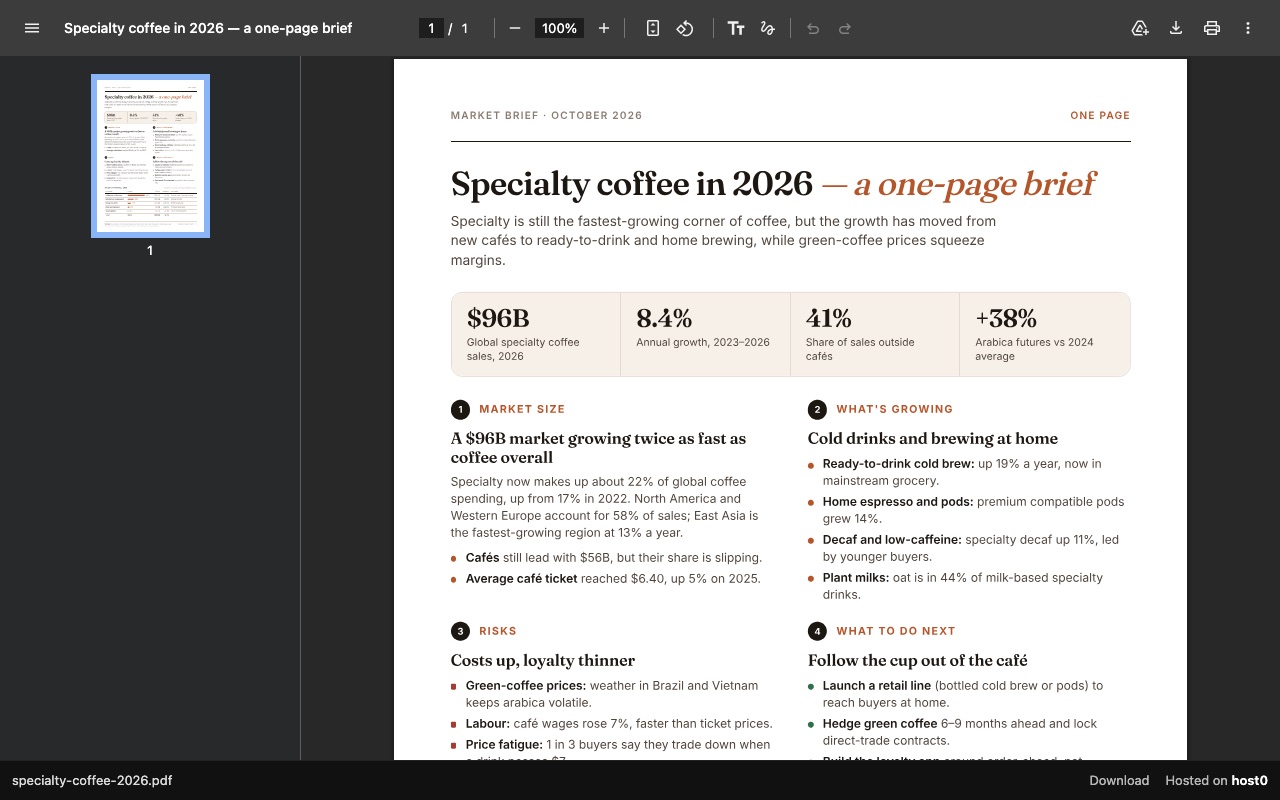
One-page report as a PDF link
A PDF report that opens in any browser, with a download button.
Built with Claude Code
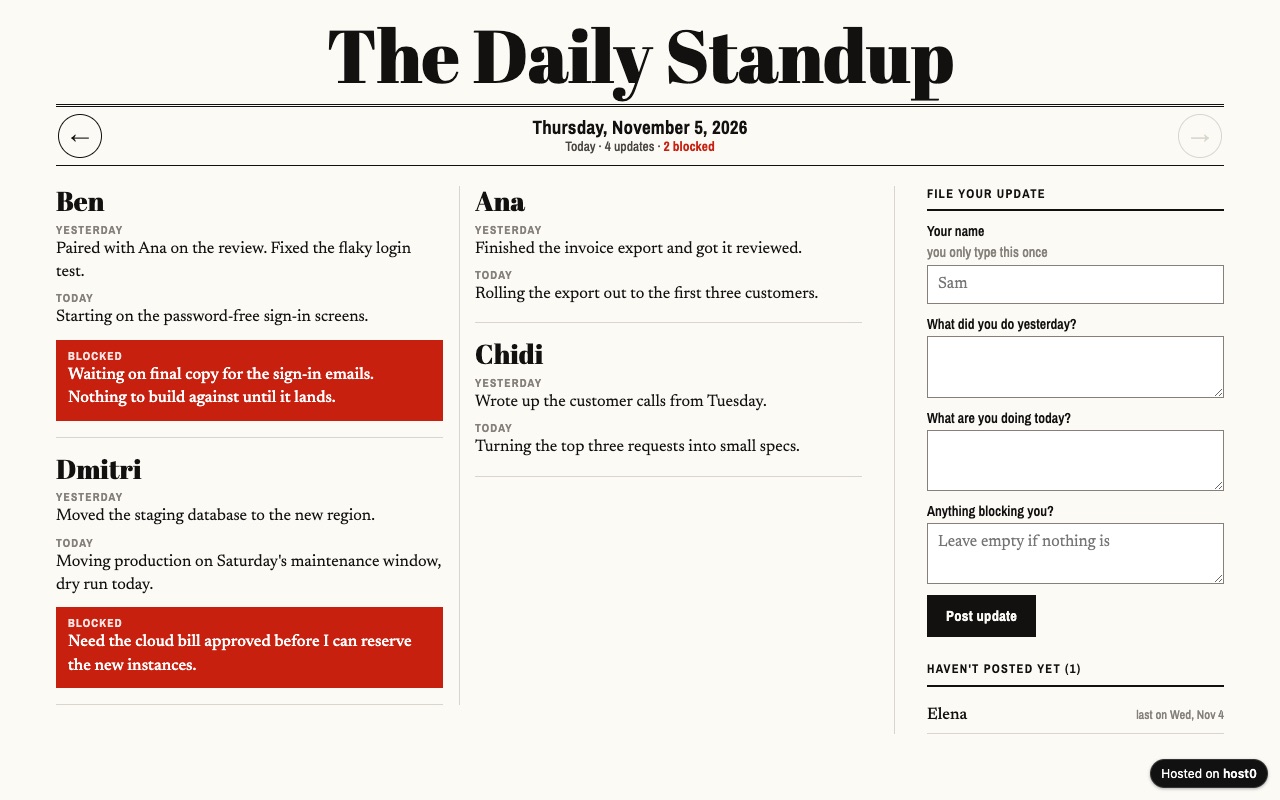
Async standup log
Your remote team posts daily updates on one page instead of a meeting.
Built with Claude Code
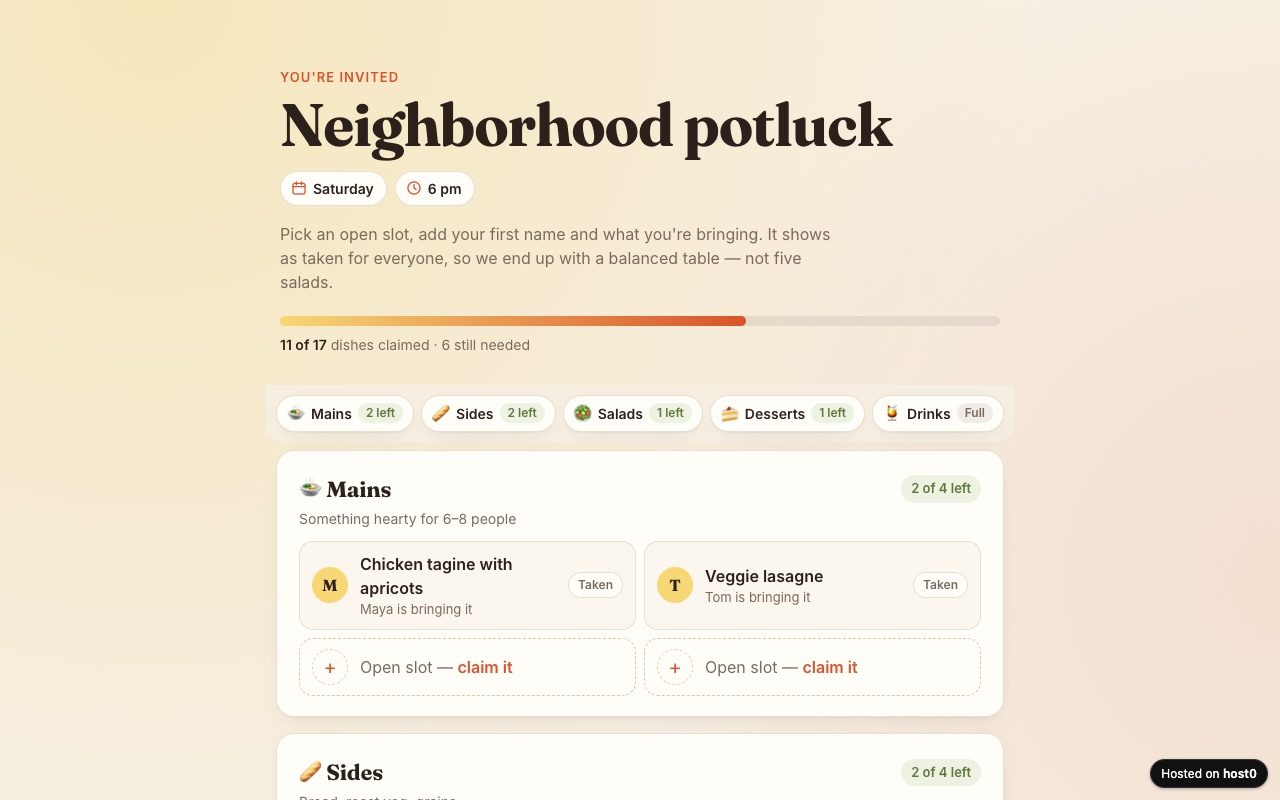
Potluck sign-up sheet
Guests claim a dish so you don't end up with five salads.
Built with Claude Code
Undo a bad deploy, and see who opened it
Versions
Each republish of one folder adds a numbered version behind an unchanged URL. When a run goes wrong, message your agent to roll back, or restore from the dashboard. On Free: live version only. On Pro: 30 days of version history.
Analytics
Page views, countries and referrers on every app, with no cookies and nothing for you to install. On Free: total visits only. On Pro: full, 90 days.
OpenClaw and host0: questions
Does host0 run my OpenClaw agent?
No. host0 runs no agents and no server processes of yours. Your Gateway stays on your own machine or server, and host0 serves the files and shared data it publishes.
Does this cost anything on top of OpenClaw?
Free plan, no card. Pro is $9 a month. On Free, a file can be up to 3 MB and an account holds 5 apps. OpenClaw's docs say it has no paid tier of its own, and your server and model costs don't change.
OpenClaw doesn't see the skill. What do I check?
Run openclaw skills check on the Gateway host, which separates skills that were found from those that are ready and visible. If you set OPENCLAW_STATE_DIR, the shared folder is skills inside that directory rather than ~/.openclaw/skills. Existing sessions pick up new skills on their next turn unless skills.load.watch is off, in which case restart the Gateway.
How do I redeploy from another chat?
Ask the same agent again from any channel. The app is tied to the folder through .host0/state.json, not to the conversation. A different agent has its own workspace, so give it the slug, or it creates a new app.
Do the people I share with need OpenClaw?
No. They open an ordinary URL in a browser and never touch your Gateway. They sign in only if the app is private or they're changing shared data.
What can't my agent publish?
Anything that needs a process. A dev server your agent started on the Gateway host won't move to host0, so ask for static output, and move lists and forms to shared records. An archive is refused too, so have the agent extract a zip and publish the folder.
Sources
Facts about OpenClaw checked on Nov 6, 2026. Products change: if something here is out of date, tell us at support@host0.ai.
- OpenClaw docs: overview
- OpenClaw docs: install
- OpenClaw docs: Linux server
- OpenClaw docs: skills
- OpenClaw docs: creating skills
- OpenClaw docs: ClawHub
- OpenClaw docs: ClawHub security audits
- OpenClaw docs: tools overview
- OpenClaw docs: tool policy
- OpenClaw docs: exec tool
- OpenClaw docs: exec approvals
- OpenClaw docs: sandboxing
- OpenClaw docs: sandbox images and setup
- OpenClaw docs: groups
- OpenClaw docs: connect MCP servers
- OpenClaw docs: MCP transports and OAuth
- OpenClaw docs: image and media support
- OpenClaw docs: Tailscale
- The host0 skill on GitHub
- The host0 skill on skills.sh
Publishing from something else?
Share what OpenClaw made
A link in one sentence, private until you say otherwise.
Get startedhost0 isn't affiliated with OpenClaw or its maker. Product names and marks are used only to identify the product.