AgentsGitHub Copilot
Turn what GitHub Copilot built into a link you can share
Copilot's docs describe no hosting for what it builds, and GitHub has closed Spark, the tool that deployed apps. Add the host0 skill, use Agent in VS Code or the copilot terminal, and ask it to publish: one approved command gives you a live URL that stays private until you share it. We wrote these steps from GitHub's and VS Code's docs. We haven't run them in Copilot ourselves, so treat them as should work.
Free plan, no card. Pro is $9 a month.
Who can open what you publish
Agent, the terminal and a cloud session all land on the same default: private. Stay in that chat and say who it's for, like "open it to anyone with the link" or "invite sam@acme.com", and approve the command Copilot proposes.
- Private: the default. You and people you invite by email, each signing in as themselves.
- Anyone with the link: no sign-in, unlisted and never indexed.
- Public on the web: no sign-in, and search engines may index it.
Access
- No one yet. Add an address and watch the visitor's window.
Sign in to view Team todos
This app is private — sign in to check your access.
Continue with Googleyou@company.comContinueNothing is served until they sign in, and only people you've invited get past that.
x-robots-tag: noindex, nofollow, noarchiveWays to connect GitHub Copilot
| Route | What it can do | Set it up |
|---|---|---|
Skill: Copilot in VS Code, Copilot CLI and the Copilot app share one format. Put the skill in ~/.copilot/skills/host0 and it loads when you ask to publish, or when you type /host0. Best for: Your own machine, since it deploys and manages | What it can do: Deploys, Manages | The second command needs Node 22.20 or newer and installs into the current project, in |
host0 CLI: No skill needed: tell Copilot to run this, or prefix it with ! in a Copilot CLI session to run it yourself. Without the skill, Copilot doesn't know host0's rules for private links and shared data. It needs Node 18.18 or newer. Best for: One deploy, or a script | What it can do: Deploys, Manages | |
MCP server: The command writes to ~/.copilot/mcp-config.json, which Copilot CLI and VS Code's Copilot sessions both read. The JSON is for .vscode/mcp.json, if you stay on VS Code's older Local sessions. It signs in with OAuth and handles apps that already exist. Best for: Managing what's live, never deploying | What it can do: Can't deploy, Manages | .vscode/mcp.json |
| Browser drop: Open host0 in a browser and drag in a build folder, one file or a zip. Copilot isn't involved, so it doesn't matter which editor made the files. Best for: Seeing the result before any setup | What it can do: Deploys, Dashboard to manage |
Does GitHub Copilot host what it builds?
Not any more for new projects. GitHub Spark built and deployed apps on github.com, but it stopped taking new users and new apps on August 4, 2026, and access ended on August 31. GitHub Pages is what's left on GitHub itself, and for a public site from a repository it's often the right choice.
If you already deployed a Spark app, GitHub says it keeps working after the shutdown, so there's no need to move it unless it calls llm(): those calls stopped on July 30, when GitHub Models was retired. Editing it needed the code exported to a repository by August 31. github.dev doesn't help here either: it's an editor with no compute, so it can't build, open a terminal or deploy anything.
| GitHub Pages | host0 | |
|---|---|---|
| Starts from | A repository, with an optional build. Up to 10 minutes for a push to publish | A folder or a file, with no repository needed |
| Who can open it | Anyone on the internet. Private sites need an organization on GitHub Enterprise Cloud, and viewers need read access to the repository | Only you at first, then people you invite by email, anyone with the link, or the whole web |
| Saving data | Static hosting only | Shared records from an h0.json, also with no server code |
| Cost | Free for public repositories. Private repositories need Pro, Team or Enterprise | Free plan, no card. Pro is $9 a month. |
Choose Pages when the site is public, the code is already on GitHub and you want each push to deploy it. Choose host0 when the audience doesn't have GitHub accounts, the page should stay private without an Enterprise plan, or people need to write to it. The full comparison is at /compare/github-pages.
Which parts of Copilot can publish to host0?
The ones that can run a command. That means Agent in VS Code and Copilot CLI first, with the cloud agent as a harder case. Ask in VS Code can't: it only has read-only tools, so switch the agent picker to Agent.
| Where | Reads skills | Can it publish? |
|---|---|---|
| VS Code, Agent | Yes | Should work: it runs the deploy in the terminal, after you approve it |
| VS Code, Ask | Not applicable | No: read-only tools |
| Copilot CLI | Yes | Should work: same runtime as VS Code's Copilot sessions |
| Copilot app | Yes | Should work, on the same runtime. We haven't checked how it asks for approval |
| Cloud agent | From the repository only | Should work once the firewall allows host0, see below |
| github.dev | Not applicable | No: there's no terminal |
| JetBrains, Xcode, others | Not on GitHub's list | Run Copilot CLI or the host0 CLI in a terminal instead |
The deploy itself is covered by our test suites. Copilot driving it isn't, which is why these rows say should. If a step differs for you, tell us at support@host0.ai.
Where does the skill need to be for Copilot to find it?
In ~/.copilot/skills/host0 for every project, or .github/skills/host0 for one repository. The trap is host0's plain installer, which picks folders from what's in your home directory: if that's Claude Code, the skill lands in ~/.claude/skills, and GitHub's list of personal folders for Copilot CLI doesn't include that one.
- Personal:
~/.copilot/skillsor~/.agents/skills. GitHub lists both for Copilot CLI, and VS Code lists the first for Copilot sessions. - One repository:
.github/skills,.claude/skillsor.agents/skills. Commit it and teammates get it too, along with any cloud agent working in that repository. ~/.claude/skills: read by VS Code's Local sessions, not on GitHub's list for Copilot CLI.
For a repository, GitHub CLI can do the copying. gh skill is in public preview, needs version 2.90.0 or newer and installs for Copilot at project scope by default. We haven't run it against our skill, and GitHub says to preview any skill before installing it.
gh skill install host0-ai/skills host0To check, start a fresh chat in VS Code and type /: host0 should be in the list. In Copilot CLI run /skills reload, then /skills info host0. If you move the skill, keep the folder named host0, because VS Code won't load a skill whose name doesn't match its folder. Being found doesn't guarantee being picked either, so starting your request with /host0 is the reliable way.
Will Copilot ask before it deploys?
Usually, and you should read what it shows you, since a deploy changes what people see at that URL. There are two exceptions in VS Code: worktree sessions in the Agents window always use Allow all, and with sandboxing on, the runtime can approve a sandboxed command without a prompt.
| Where | What you see | What the wider choice covers |
|---|---|---|
| VS Code, Manual permissions | Allow Once, with narrower or longer grants in its dropdown | A command prefix, for this session or always. Always Allow saves it to chat.tools.terminal.autoApprove |
| VS Code, Allow all or Autopilot | No prompt | Every tool call, deploys included |
| Copilot CLI | Yes, Yes for the session, or No | That tool with any options for the rest of the session, so more than this one deploy |
Approve once until you trust the routine. Our skill doesn't pre-approve anything, and GitHub warns against adding allowed-tools: shell to a skill unless you've reviewed it and trust its source, because that removes the confirmation for every terminal command it runs.
Can VS Code's sandbox or a company policy block the deploy?
Not on a default setup: VS Code's agent sandbox is off by default, and turning it on still leaves outbound network access allowed. It gets in the way once you, or your organization, set an allowlist of domains, or if the sandbox can't write outside your project.
- Network: add
host0.aiandhost0.apptochat.agent.sandbox.network.allowedDomains. The API is on the first and uploads go to the second. A managed policy can overrule your settings, and then it's your admin's call. - Files: the sandbox grants write access to the working directory, and your key lives outside it in
~/.host0/credentials. If login can't save the key, add~/.host0toreadwritePathsinchat.agent.sandbox.fileSystem.userConfiguredPaths. We've inferred this one from the docs and haven't hit it ourselves. - To see what applies, send
/sandbox policyin a Copilot session. It writes a report without starting a model turn.
If a command can't run in the sandbox, VS Code can offer to run it outside. That lifts the file and network limits for that command, so prefer the narrower settings above.
Should the MCP server go in .vscode/mcp.json or mcp-config.json?
Use ~/.copilot/mcp-config.json, by the command below or by choosing Global, then Copilot Global, under MCP: Add Server in VS Code. Copilot CLI doesn't read .vscode/mcp.json at all, and VS Code now marks it deprecated when you add a server, though it still forwards eligible servers to Copilot sessions.
copilot mcp add --transport http host0 https://mcp.host0.ai/mcpThe two files aren't interchangeable: .vscode/mcp.json has a top-level servers key and the portable one has mcpServers. Whichever you use, this server never deploys. Once something's live, it covers visibility and invites, renaming, versions and restores, records, custom domains and analytics. If its token expires in the terminal, run /mcp auth host0 to sign in again. We haven't run this sign-in in Copilot yet.
Why did Copilot create a second app instead of updating mine?
Because that session worked in a folder with no .host0/state.json, which is how a deploy recognizes your app. A new worktree from the Agents window or a fresh clone won't have it, and it should stay out of git.
Give the slug from its URL in your prompt, as in "publish my changes to host0 app team-todos", and the deploy updates that one. If the session doesn't have the files at all, the skill can pull what's live first. Delete the duplicate from your dashboard, or ask Copilot to.
Can the Copilot cloud agent publish from an assigned task?
It should work, but we haven't run it. The agent works in its own short-lived environment behind a firewall, so a repository admin has to let it reach host0 and give it a key.
- Firewall: in the repository's settings, go to Copilot, then Internet access, and add
host0.aiandhost0.appto the custom allowlist. A blocked call shows up as a warning on the pull request. JavaScript package registries are on the recommended allowlist, so the CLI can download. Your organization can lock these settings. - Key: make one in your host0 dashboard and add it as
HOST0_API_KEYunder Secrets and variables, then Agents. Actions secrets don't reach the agent, and aCOPILOT_MCP_prefix would hide it from the command. Device login isn't practical here, since nobody's watching to approve it. - Skill: commit it to
.github/skills/host0. Your home folder isn't there. - App: name the slug in the task, since each run starts without
.host0/state.json.
Two limits follow. A deploy is live when it finishes, which is before anyone reviews the pull request, so point this agent at a separate preview app and not the URL your team uses. And for servers configured in repository settings, GitHub says the cloud agent doesn't support remote MCP over OAuth, so manage apps from the CLI there, using the same key.
Real apps, live on host0
Each one came from a single prompt. Open it, or paste the prompt into GitHub Copilot to get your own copy.
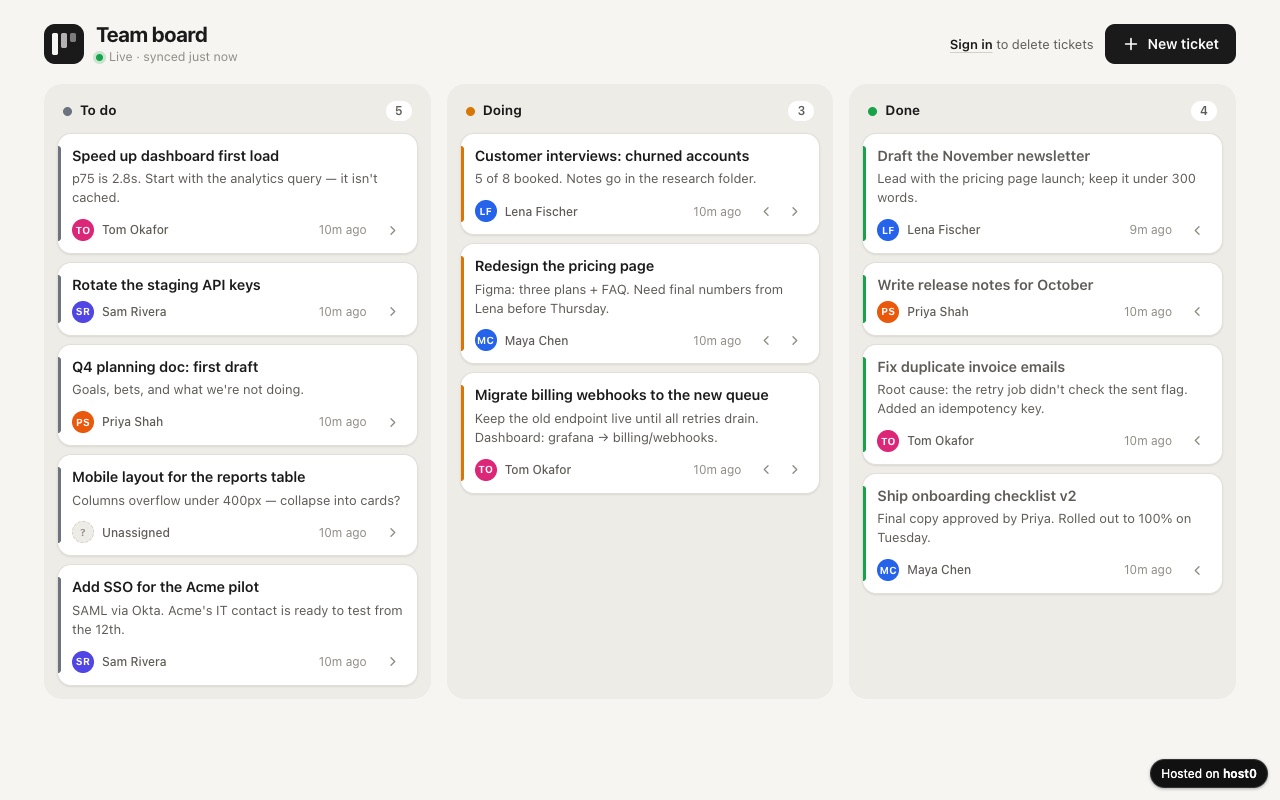
Team ticket board
A shared to-do board with three columns your whole team works on.
Built with Claude Code
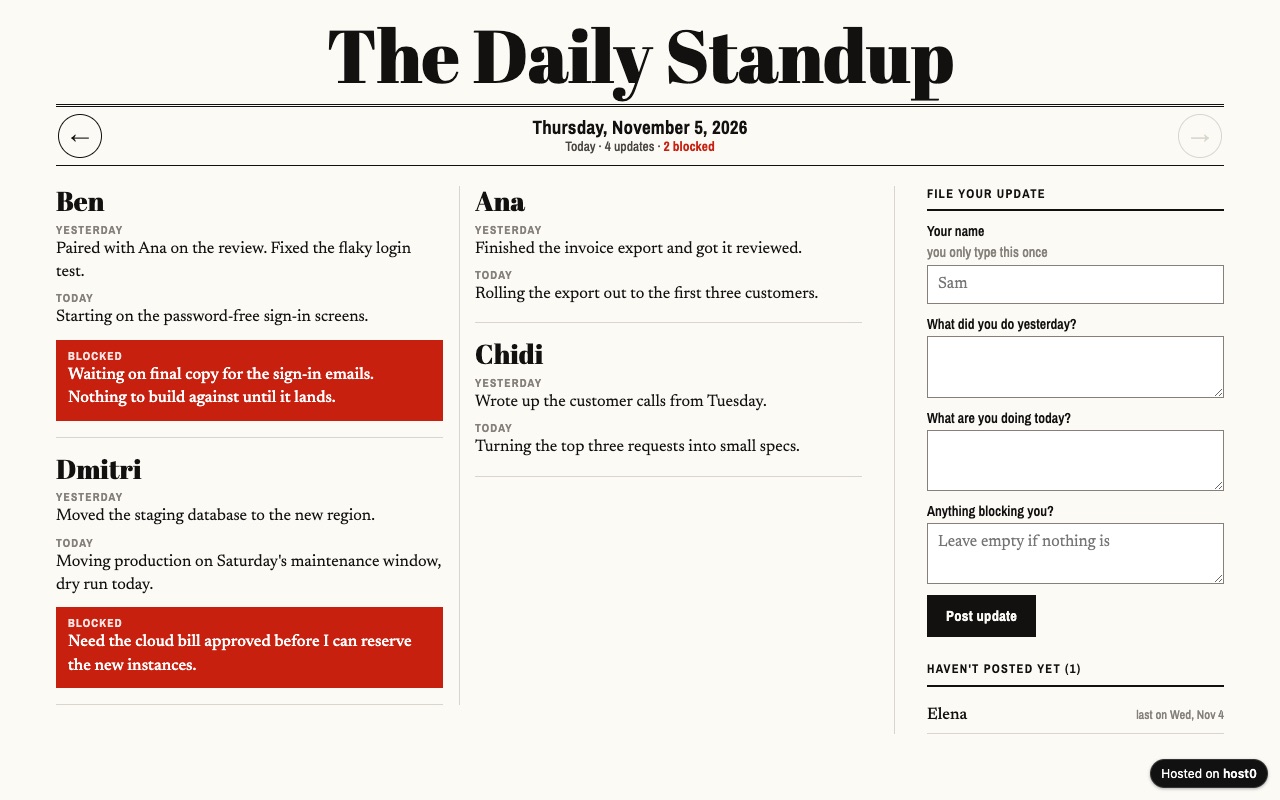
Async standup log
Your remote team posts daily updates on one page instead of a meeting.
Built with Claude Code
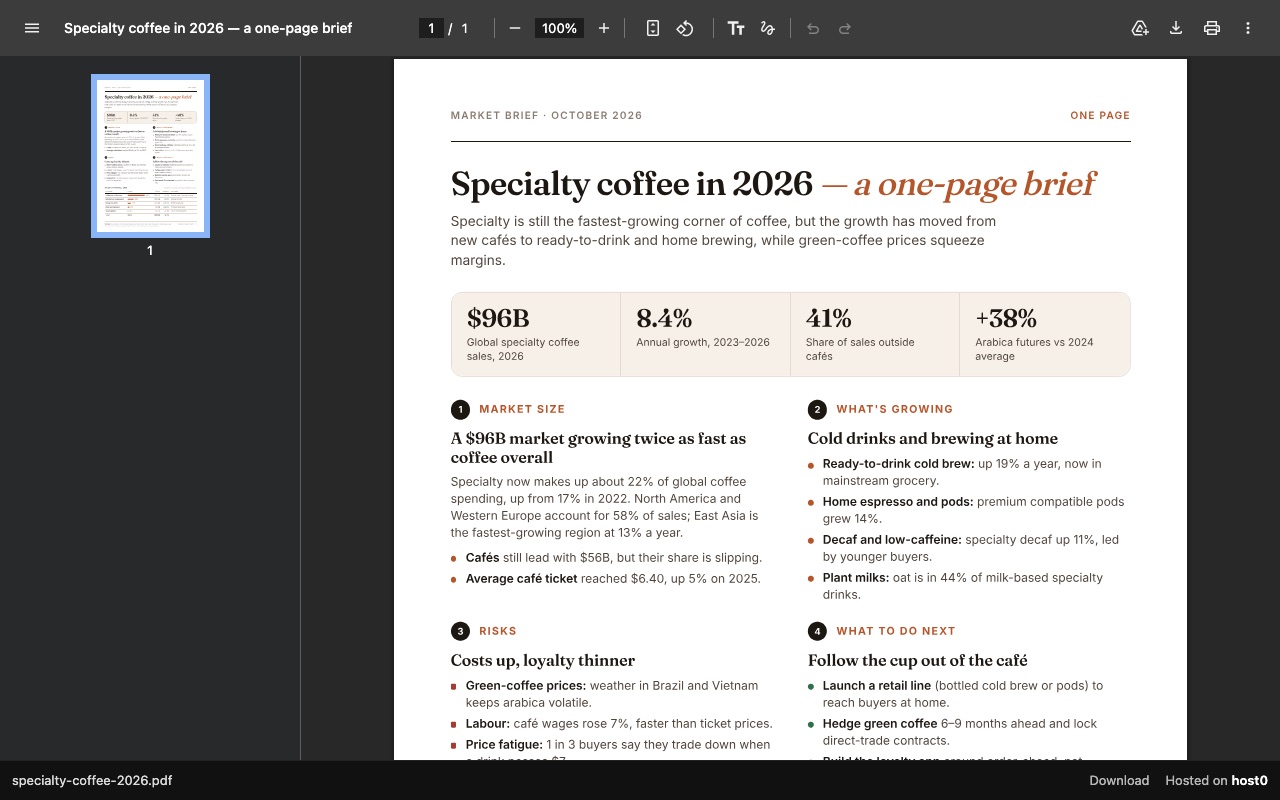
One-page report as a PDF link
A PDF report that opens in any browser, with a download button.
Built with Claude Code
Undo a bad deploy, and see who opened it
Versions
Git keeps the history of your source. host0 keeps what actually went live: each redeploy is a numbered version at the same URL, and you can ask Copilot to add a note saying what changed. On Free: live version only. On Pro: 30 days of version history.
Analytics
Page views, countries and referrers on every app, with no cookies and nothing for you to install. On Free: total visits only. On Pro: full, 90 days.
GitHub Copilot and host0: questions
Has host0 been tested in GitHub Copilot?
Not by us yet. The deploy command and the skill's script have test suites, and the CLI labels a deploy as coming from Copilot when it spots Copilot's environment, but we haven't run a full session in VS Code or Copilot CLI. This page follows GitHub's and VS Code's docs as of the date below.
Do the people I share with need GitHub or Copilot?
Neither. A host0 link opens in any browser. If the app is private, or they want to change shared data, they sign in with an email code or Google. That's the main difference from a private GitHub Pages site, where every viewer needs read access to the repository.
Copilot says it doesn't have a host0 skill. What do I check?
First the folder: SKILL.md has to be at ~/.copilot/skills/host0/SKILL.md, or in a skills folder in the repository. Then the session: in VS Code start a new chat, and in Copilot CLI run /skills reload. Use Agent rather than Ask, and start the request with /host0.
Can I use Copilot in JetBrains or Xcode?
Not through the skill, as far as GitHub's docs go: its list of surfaces that read agent skills names agent mode in VS Code and no other editor. Run Copilot CLI or the host0 CLI in that editor's terminal, or drop the build on host0 in a browser.
What can't Copilot publish to host0?
Anything that needs a server process, such as an Express API or Next.js server routes: have Copilot build static output and publish that, and move lists or forms to shared records. A zip is refused from the command line too, so publish the extracted folder.
What does it cost, and does my Copilot plan matter?
Free plan, no card. Pro is $9 a month. On Free, one file can be up to 3 MB and you can have 5 apps. Your Copilot subscription and your host0 account are separate, so Copilot's plan doesn't change those limits.
Sources
Facts about GitHub Copilot checked on Nov 6, 2026. Products change: if something here is out of date, tell us at support@host0.ai.
- VS Code docs: Use Agent Skills
- VS Code docs: Add MCP servers
- VS Code docs: MCP configuration reference
- VS Code docs: Choose an agent harness
- VS Code docs: Manage approvals and permissions
- VS Code docs: Sandbox Copilot agent sessions
- GitHub docs: Agent skills for Copilot CLI
- GitHub docs: Agent skills and gh skill
- GitHub docs: MCP servers for Copilot CLI
- GitHub docs: Copilot CLI command reference
- GitHub docs: Using Copilot CLI
- GitHub docs: Configure MCP servers for your repository
- GitHub docs: Copilot firewall
- GitHub docs: Secrets for Copilot cloud agent
- GitHub changelog: Deprecation of GitHub Spark
- GitHub docs: What is GitHub Pages?
- GitHub docs: Visibility of a Pages site
- GitHub docs: github.dev
- skills CLI: Supported agents
- host0 vs GitHub Pages
Publishing from something else?
Share what GitHub Copilot made
A link in one sentence, private until you say otherwise.
Get startedhost0 isn't affiliated with GitHub Copilot or its maker. Product names and marks are used only to identify the product.