AgentsGrok Bot
Get a link you can share from Grok Bot or Grok Build
Grok Bot works on a cloud computer with a terminal, so it can run the host0 skill and post the live URL in its chat. Grok Build does the same from your own terminal. We've read the docs for both but haven't run either yet, so treat this as what should happen. An MCP server is optional and never deploys.
The Grok app at grok.com is a different product. Its docs don't describe a terminal you control or a way to publish, so there you save the file and drop it on host0.
Free plan, no card. Pro is $9 a month.
Who can open what you publish
What a Bot publishes starts private: only you, signed in to host0, can open it, whatever Cursor or X account the Bot works under. Tell it in the same chat when that should change: "make it a link anyone can open" or "invite sam@acme.com".
- Private: the default. You and people you invite by email, each signing in as themselves.
- Anyone with the link: no sign-in, unlisted and never indexed.
- Public on the web: no sign-in, and search engines may index it.
Access
- No one yet. Add an address and watch the visitor's window.
Sign in to view Team todos
This app is private — sign in to check your access.
Continue with Googleyou@company.comContinueNothing is served until they sign in, and only people you've invited get past that.
x-robots-tag: noindex, nofollow, noarchiveWays to connect Grok Bot
| Route | What it can do | Set it up |
|---|---|---|
| Skill on Grok Bot: The Bot fetches the skill onto its cloud computer and signs in with a link you approve. It should work; we haven't run it on a Bot. Best for: Work a Bot does for you, from any device | What it can do: Deploys, Manages | Copy the setup prompt at the top of this page, send it to your Bot, and approve the link it shows you. Then have the Bot save the process as a skill, so your other Bots can use it. |
Skill in Grok Build: Grok Build looks in ~/.agents/skills, and this installer's codex option writes there. A copy you already have in ~/.claude/skills is picked up too. It appears as /host0, or just ask. Best for: Publishing from a repo on your own machine | What it can do: Deploys, Manages | ~/.agents/skills/host0 |
host0 CLI: One deploy with nothing to install, wherever Node 18.18 or newer is available. The Grok Bot docs don't list what its computer has installed. If Node is missing, the skill switches to publish.sh, which needs curl and jq. Best for: Scripts and a single publish | What it can do: Deploys, Manages | |
| MCP server: In Grok Build, run this, and OAuth starts on first use. For Grok Bot, tell it to add the URL in this command as an MCP server, then sign in on the Connect card. Neither has been run against host0 yet. Best for: Changing what's live without leaving the chat | What it can do: Can't deploy, Manages | |
| Custom connector in the Grok app: This manages apps from a Grok chat and can't publish them. It should work, but we haven't run it. Best for: Managing apps if you live in the Grok app | What it can do: Can't deploy, Manages | Go to grok.com/connectors, choose New Connector, then Custom, and enter the URL from the MCP command above. On Grok Business and Enterprise, an admin has to provision it first. |
Browser drop: Save what the Grok app wrote as an .html file, or download what a Bot sent you, and drag it onto host0. Sign in with an email code or Google. Best for: The Grok app, or trying this with no setup | What it can do: Deploys, Dashboard to manage |
Grok Bot, Grok Build or the Grok app: which one can publish?
Grok Bot and Grok Build can, because each of them runs commands. The Grok app can't on its own: you save what it made and drop it on host0.
| Grok Bot | Grok Build | Grok app | |
|---|---|---|---|
| What it is | AI teammates you message from desktop and phone apps | A coding agent you start with grok in a terminal | A chat assistant at grok.com and on iOS and Android |
| Where work runs | A persistent cloud computer, even with your laptop closed | Your own machine | In the chat. Its FAQ mentions running code on uploaded files, not a terminal you control |
| You sign in with | A Cursor account | A browser sign-in, or XAI_API_KEY where there's no browser | A Grok account |
| On The X Subscription | Premium, Super and Ultra, not Free or Plus | Included from Plus up | Limited on Free, included from Plus up |
| Getting it on host0 | It runs the skill | It runs the skill | You drop the file |
The Grok Bot docs are firm that the Bot and the Grok app are separate apps, so a paywall you hit in one isn't about the other. Grok Studio is gone as well: the Grok FAQ says it's no longer supported and points to Grok Build.
Is a Grok Bot page the same as a host0 link?
No. A page is something the Bot writes for people to read, and nothing a visitor does on it is saved. If reading is all they need, use a page: it takes one sentence to the Bot and no second account.
| Grok Bot page | host0 link | |
|---|---|---|
| What it holds | Text, tables, charts, filters and switches | Any static site or app, or one file a browser can open |
| Who can open it | Only you, your Cursor team, people you invite (not on a personal account), or anyone with the link | People you invite by email, anyone with the link, or the whole web |
| Invited people sign in with | A Cursor account | A host0 account, which the invitation lets them make |
| Saving what visitors do | No: controls only change their view | Yes, with shared data from an h0.json |
| Who can change it | Only the Bot | Any agent you use, by redeploying |
| Address | On pages.grok.bot, from the title, with no custom address yet | A random one you can rename. Pro includes 3 custom domains per account; Free has none. |
| Availability | Rolling out gradually, and not on Enterprise teams yet | Free plan, no card. Pro is $9 a month. |
Keep pages for reports, dashboards and trackers only the Bot updates. Reach for host0 when someone should add data, when you're on a personal account and want to invite one person by email, or when the Bot built a real site rather than a page.
What happens the first time I ask my Bot to publish?
It should fetch the skill, ask you to approve a sign-in, and post the URL in the chat. We've worked that out from the Grok Bot docs and haven't run it on a real Bot yet.
- You send the setup prompt. The Bot works on its own computer, not the one in front of you.
- An approval card may come up before a command runs, depending on Auto Review. A warning that this shares data outside the chat is accurate, because the files go to host0. Check the folder, then allow it.
- The Bot shows a link and a short code. Links in a chat open in your system browser, so you approve there and type nothing into the chat.
- The URL comes back in the chat. Until you say otherwise, it's private.
- On an Enterprise team with a network allowlist, an admin has to add
host0.aiandhost0.appfirst. Other teams default to allow-all.
Once it works, make it stick: "Save the process we just used as a skill called Publish to host0." Private skills are one library across your Bots. If another Bot can't find it, turn it on for that Bot under Private skills in Connect apps.
Where does my host0 key go on a Bot's computer, and who can use it?
The device login saves it to ~/.host0/credentials on the cloud computer, and every Bot on your account can use it from there. All your Bots share one computer, command-line credentials included, so separate Bots aren't a wall between projects.
- The Grok Bot docs say not to put an API key in a file on the computer, and to prefer their secure secret card. The skill's sign-in does write a file, and we'd rather you knew. If that's a problem, publish from Grok Build or the browser drop.
- Recover, Reset and some computer updates can remove a secret kept in a file. If a deploy asks you to approve a sign-in again, that's the likely reason, and approving again fixes it.
- To cut a key off, revoke it in your host0 dashboard. Deleting a Bot doesn't help, since files and sign-ins stay on the computer.
- A teammate's shared Bot usually works on your computer in your own chat, so it uses your key. In a Slack channel it has one computer of its own, and it publishes to whichever account signed in there.
What can a Bot publish, and what has to change first?
A folder of static files, or one file a browser can open. A deck, spreadsheet or Word file it made won't publish alone, so ask for a PDF or CSV of it.
- A site: a folder with
index.htmlat the top. A folder without one is refused, with a message that says so. - One file: a PDF, image, HTML page, video, audio, Markdown, CSV or text file. That covers the images and MP4 clips a Bot creates.
- Size: on Free, a file can be up to 3 MB, so check a video first.
- A running server: host0 can't run server code, and the Grok Bot docs don't describe a public address for something running on its computer. Ask the Bot to move lists and forms to shared data, which needs no server.
How do I update something my Bot already published?
Ask any of your Bots to publish that folder again. The deploy finds the app from .host0/state.json in the folder, so the URL stays put and unchanged files aren't sent twice.
Have the project live in /workspace, the shared folder the docs recommend for files you want to keep. They warn that temporary folders are replaceable and node_modules isn't saved, so a build may need a fresh install after a Reset.
With no state file, a deploy makes a new app at a new URL, which is also what happens if you move the work to Grok Build, because your machine and the Bot's computer don't share files. Give the slug from its URL to avoid it: "publish this as the next version of team-todos".
Can a routine republish a page on a schedule?
It should, at the same link, but settle the approval first. A card raised by a routine expires after 30 minutes, and an expired card means the Bot didn't do the action.
- Do the whole job once in chat, then save it as a skill.
- Add one narrow rule under Settings, General, Auto-review, Custom Rules: allow the host0 deploy in
/workspace/reports, say. An Allow rule still lets the review stop on another reason. - Test runs real work, so it publishes a real version. Use an app that isn't shared yet.
- Every run spends weekly Grok usage, and schedules must be at least five minutes apart. Daily suits this better than hourly.
- Tell the routine never to change who can open the app. The docs suggest keeping publishing behind approval, and an app that's already private is the lower-risk thing to automate.
If I tag @bot on X, does the link come back on X?
No. @bot posts only a short confirmation, and the work and its results stay in your main Bot's chat in the Grok Bot app. Open the app to find the URL, and to approve the sign-in the first time.
Your post is public, so don't describe anything private in it. Tagging isn't available yet for X accounts based in Australia, the UK, the EU, Iceland, Liechtenstein or Norway, and @bot stays quiet on a post with a video or GIF. Chatting with your Bots in X Chat is a separate route, and it's still rolling out.
Why would a deploy fail under a Grok Build sandbox?
Because some profiles block the network or your home folder. The sandbox is off by default, so this only comes up if you turned it on. We read this from the sandbox docs and haven't run it.
| Profile | What it means for publishing |
|---|---|
off | Nothing changes. This is the default. |
workspace | The upload can run, but a device login can't save to ~/.host0: writes are limited to the project, ~/.grok/ and temp. |
read-only, strict | Child network is blocked on Linux, so the upload fails. On macOS that block is a no-op. |
The way round both the workspace limit and an unattended grok -p run, where nobody is there to approve a link, is the same: set HOST0_API_KEY in the environment first, which the skill reads before it tries to sign in.
Real apps, live on host0
Each one came from a single prompt. Open it, or paste the prompt into Grok Bot to get your own copy.
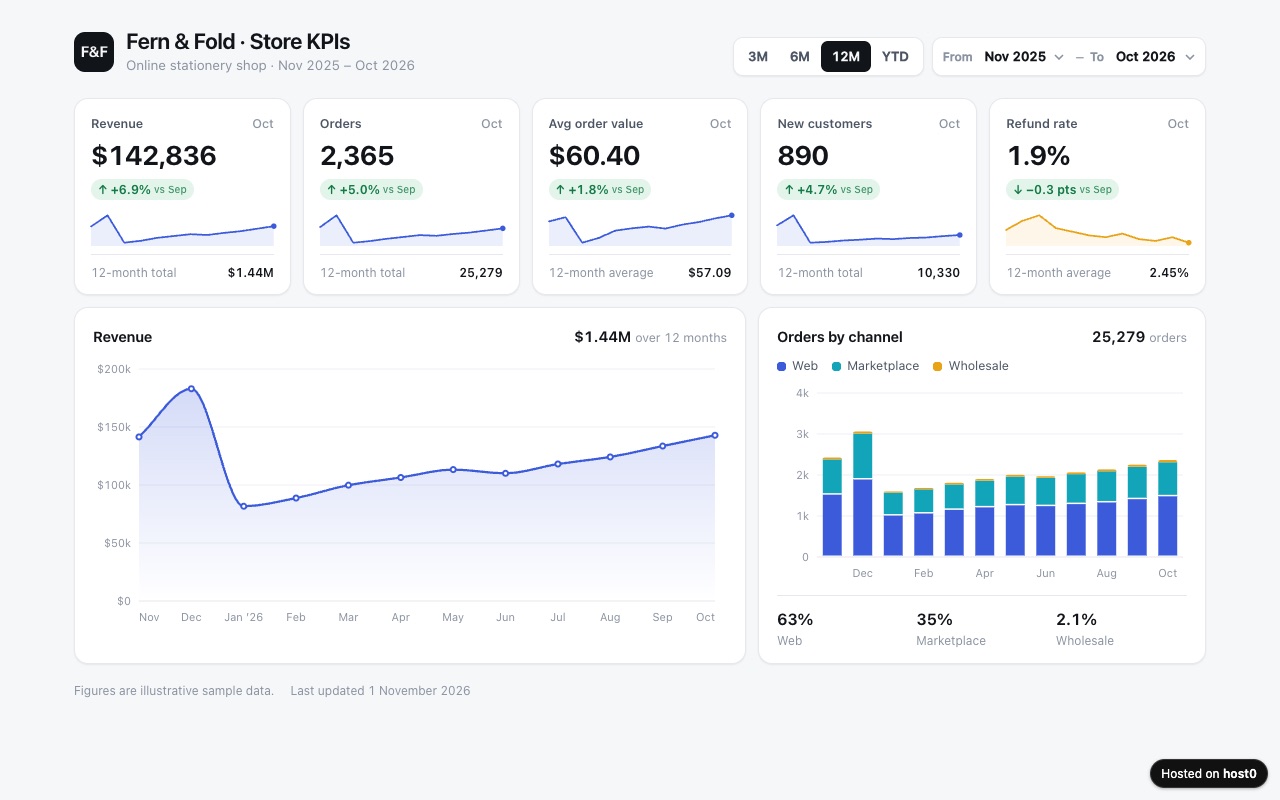
KPI dashboard
A clean metrics page from a spreadsheet, with charts and a month filter.
Built with Claude Code
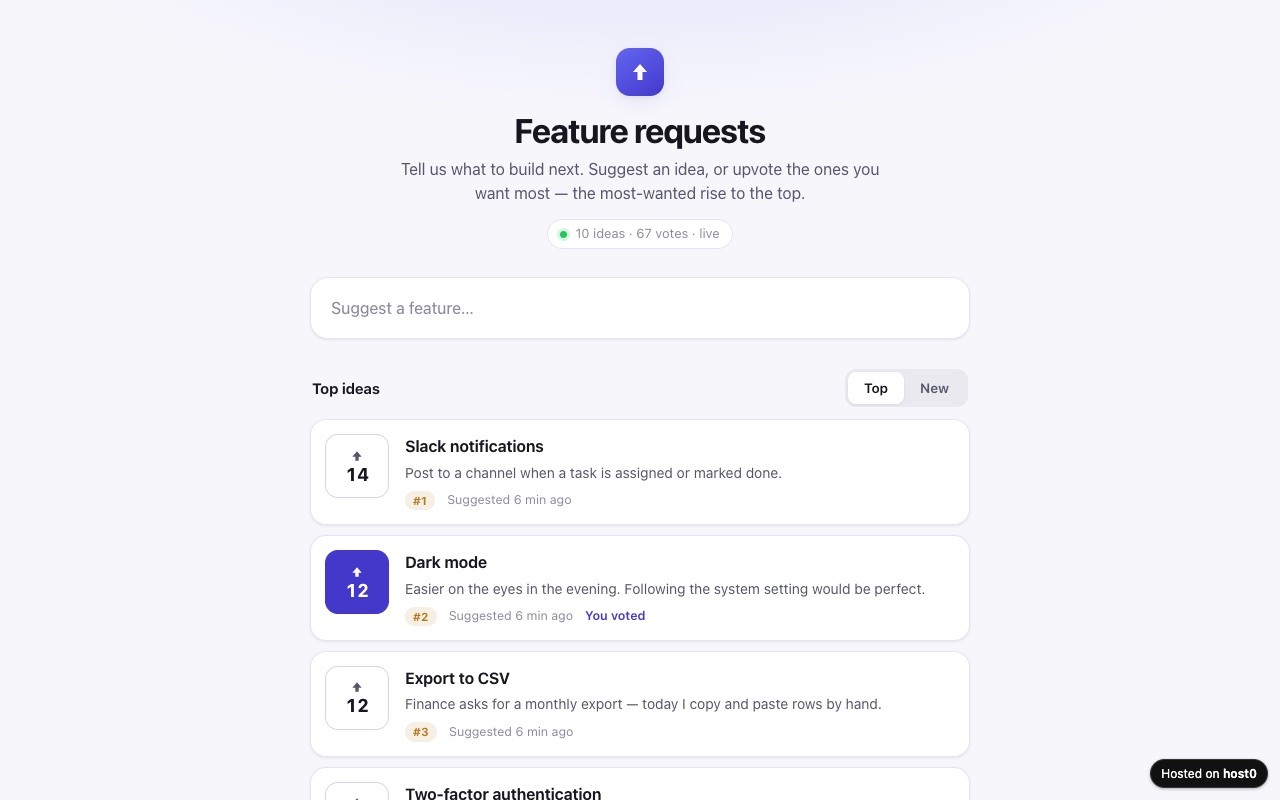
Feature request voting board
People suggest features and upvote the ones they want most.
Built with Claude Code
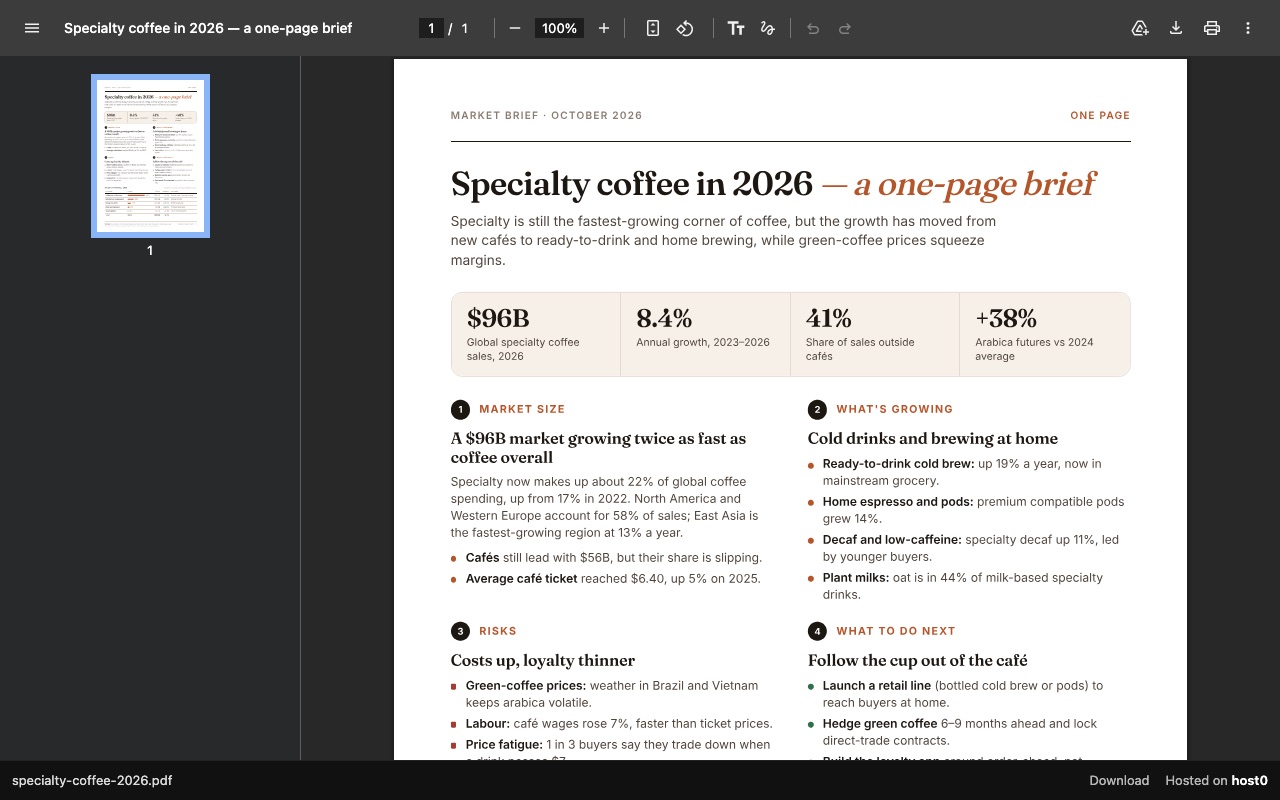
One-page report as a PDF link
A PDF report that opens in any browser, with a download button.
Built with Claude Code
Undo a bad deploy, and see who opened it
Versions
A Bot that republishes one folder adds a numbered version at the same URL, which suits a routine. If a run publishes something wrong, tell the Bot to roll back, or restore a version in the dashboard. On Free: live version only. On Pro: 30 days of version history.
Analytics
Page views, countries and referrers on every app, with no cookies and nothing for you to install. On Free: total visits only. On Pro: full, 90 days.
Grok Bot and host0: questions
Do I need a paid Grok plan to use host0?
Not for host0, which is its own account. Free plan, no card. Pro is $9 a month. Grok Bot itself comes with Premium, Super and Ultra on The X Subscription, not Free or Plus, and Grok Build is included from Plus up. The browser drop needs no Grok plan at all.
Didn't Grok Build have a /share command?
It did. The changelog says the /share command and session sharing were removed from the CLI in v1.0.51, on October 9, 2026. To give someone what you built, publish it to a link instead.
Does my Claude Code setup carry over to Grok Build?
Its docs say yes, with no extra setup: Grok Build reads Claude Code's skills and MCP configuration, so a host0 skill in ~/.claude/skills should show up. Run grok inspect to see what it found in the current directory.
Does someone opening my link need a Grok or Cursor account?
No. A host0 link has nothing to do with either. It opens in a browser, and the visitor signs in to host0 only when the app is private or they're changing its shared data.
Can my Bot publish a folder that's on my own computer?
Only if you let it reach that computer. Bots work on their cloud computer, and running commands on your desktop is a separate setting that asks each time by default. It's often simpler to attach the files in the chat: up to 20 in a message on desktop.
Sources
Facts about Grok Bot checked on Nov 6, 2026. Products change: if something here is out of date, tell us at support@host0.ai.
- Grok Bot docs: Overview
- Grok Bot docs: Get started
- Grok Bot docs: Files and results (pages)
- Grok Bot docs: Use the computer and apps
- Grok Bot docs: Skills and routines
- Grok Bot docs: Vault and secure sign-in
- Grok Bot docs: Approvals, security, and privacy
- Grok Bot docs: Security
- Grok Bot docs: Message and collaborate
- Grok Bot docs: Shared Bots
- Grok Bot docs: Tag @bot on X
- Grok Bot docs: FAQ
- Grok docs: Overview
- Grok docs: FAQ
- Grok docs: Connectors
- Grok Build docs: Overview
- Grok Build docs: CLI reference
- Grok Build docs: Skills, plugins and marketplaces
- Grok Build docs: MCP servers
- Grok Build docs: Sandbox
- Grok Build docs: Permissions
- Grok Build changelog
- Plans and pricing
- The X Subscription: pricing
Publishing from something else?
Share what Grok Bot made
A link in one sentence, private until you say otherwise.
Get startedhost0 isn't affiliated with Grok Bot or its maker. Product names and marks are used only to identify the product.