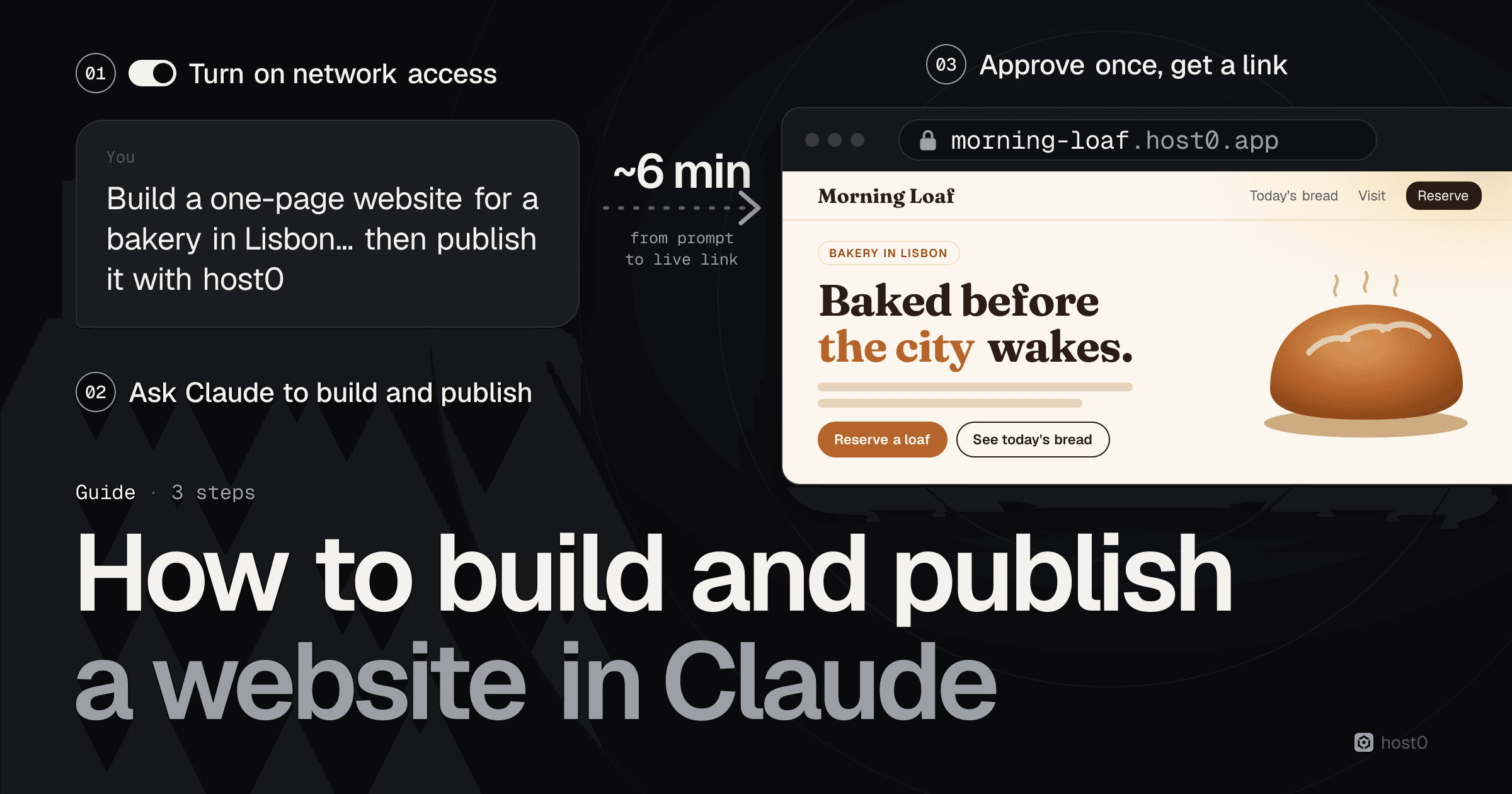
To build and publish a website in Claude, turn on code execution and network access in Claude's settings, then ask Claude to build the site and publish it with host0 in the same message, and approve one sign-in when it asks. Claude writes the page, uploads it and replies with a real link, like morning-loaf.host0.app, that anyone can open in a browser without a Claude account. In our test it took about six minutes from prompt to live link, and a minute or two of that was us signing in.
Claude has been able to make a web page for a while. The hard part is the step after: getting it onto an address you can text to someone, keeping a form's entries somewhere, and changing it next week without starting over. Since 16 September 2026 that step got harder inside Claude itself, because Anthropic's help center now says people need a Claude account to open a newly shared artifact. This guide walks through a real run in claude.ai, from settings to a live bakery site with a reservation form, with a screenshot of every step.
The short version
- 1Two settings, one prompt, one approval. Turn on code execution and network egress in Settings → Capabilities, end your prompt with "publish it with host0: follow https://host0.ai/skill.md", and approve the sign-in link Claude shows you. You don't need to install anything first.
- 2Nothing private goes into the chat. You sign in to host0 in your own browser with Google or an email code, and Claude gets access from there. You never paste an API key or your email address.
- 3Anyone can open the link, no Claude account needed. New links start private. Ask for "a link anyone can open" and it's unlisted and kept out of search engines; or keep it private and invite people by email.
- 4Forms can save to a shared database. Our reservation form writes to a
reservationscollection that only the owner can read, and the owner can export it as JSON from the dashboard. - 5You change it by asking. "Rename the link to morning-loaf and change Sunday hours" took Claude about a minute and a half. It published version 2, the old link forwards for 30 days, and you can roll back to version 1.
- 6It's free during the beta. Every page carries a small "Hosted on host0" badge in the corner.
How to build and publish a website in Claude, step by step#
We used claude.ai on the web with Claude Opus 5.5, in a fresh chat, and asked for a one-page site for an imaginary Lisbon bakery called Morning Loaf, with a menu, opening hours, a map link and a "reserve a loaf for tomorrow" form.
From a prompt in Claude to a link anyone can open
Turn on network access
Settings → Capabilities: code execution and network egress on.
Ask Claude to build and publish
One prompt: the site, then “publish it with host0”.
Approve once
Open the link Claude shows, sign in, check the code, approve.
Open your link
Live at <name>.host0.app, on a laptop or a phone.
Change it by asking
Rename, edit, roll back, all in the same chat.
Source: host0 test run in claude.ai, 11 Oct 2026
Step 1: Turn on code execution and network access#
Claude needs two things to publish a site: a place to run code, and permission to reach the internet from it. Both live in Settings → Capabilities on claude.ai.
- Cloud code execution and file creation must be on. It usually already is: Anthropic says it's available on every plan, Free included, and the same setting is needed for artifacts and skills.
- Allow network egress must be on, and Claude must be able to reach host0.ai and host0.app. Without it, Claude can build the page but can't upload it.
The account we used shows a Domain allowlist menu under the egress switch, set to All domains. If your menu lets you list domains instead, add host0.ai and host0.app. On Team and Enterprise plans an owner controls this in Organization settings → Capabilities: Anthropic says Team plans start with egress limited to "package managers only", and new Enterprise organizations start with it off, so you may need to ask your admin.
Settings → Capabilities in claude.ai
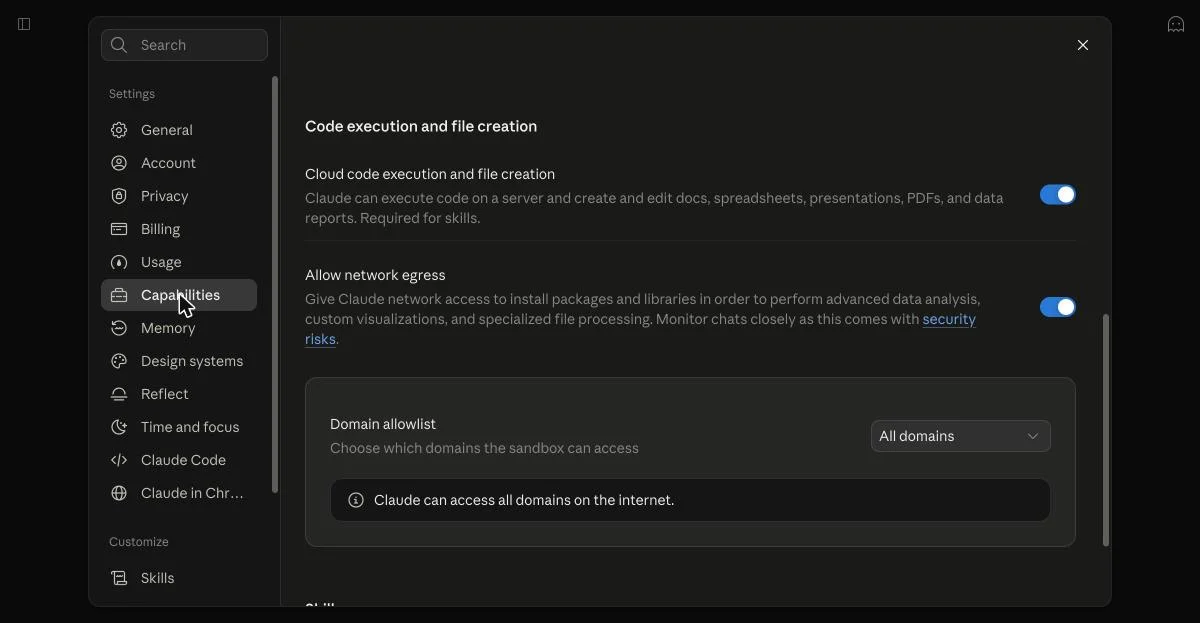
Source: claude.ai, 11 Oct 2026
Step 2: Ask Claude to build the site and publish it#
Start a new chat and describe the site, then tell Claude to publish it with host0 and point it at the instructions. You don't have to install the host0 skill first: Claude opens the link in your prompt and follows it. This is the exact prompt we sent:
Build a one-page website for a small neighbourhood bakery in Lisbon called "Morning Loaf": a hero with the tagline, today's bread menu with prices in euros, opening hours, the address with a map link, and a "Reserve a loaf for tomorrow" form (name, loaf, pickup time). Make it warm, modern and good on a phone. Then publish it with host0 so I get a real link: follow https://host0.ai/skill.md. Save the form's reservations in host0's shared database, and make the link open for anyone who has it.The prompt
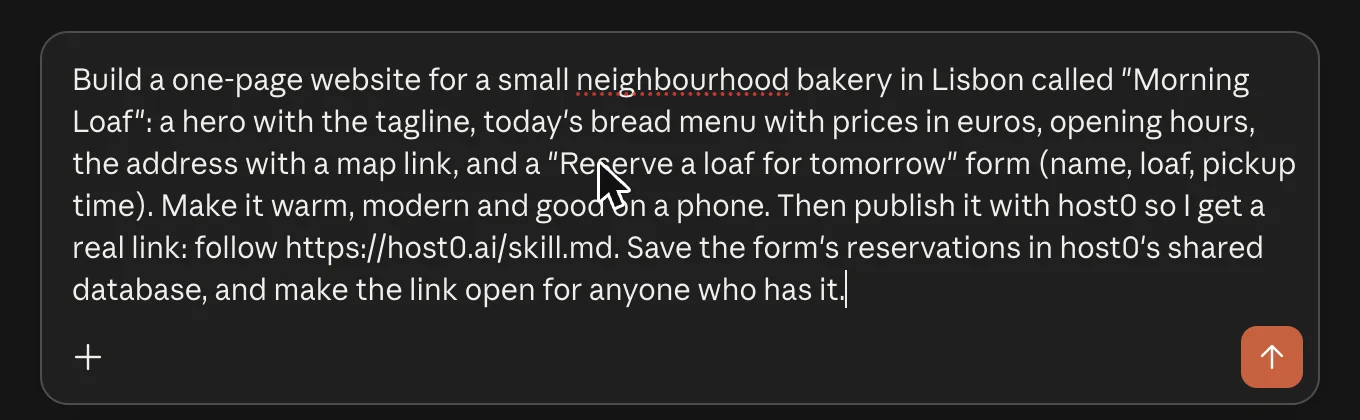
Source: claude.ai, 11 Oct 2026
To write your own, keep the same shape:
- What it is and who it's for: "a one-page site for my dog-walking business in Leeds".
- The sections: hero, prices, opening hours, a contact form, an FAQ.
- The feel: "warm, modern and good on a phone" is enough; name colours if you have them.
- Real details, if you have them: your address, prices and hours. Otherwise Claude invents placeholders, which is fine for a first draft.
- The publish line: "Then publish it with host0 so I get a real link: follow https://host0.ai/skill.md."
- If there's a form: say what to save and who can see it, like "save the sign-ups in host0's shared database; only I can read them".
- Who can open it: "make the link open for anyone who has it". Leave this out and the link stays private, so only you (and anyone you invite) can open it.
Claude then worked on its own for a few minutes. It read the instructions and wrote two files: the page itself, index.html, and h0.json, a short file that declares the reservations collection and who can do what with it.
Step 3: Approve the sign-in once#
Publishing needs a host0 account, and Claude can't create one for you. So before uploading, it stopped and showed a link and a code:
Claude asks you to approve once
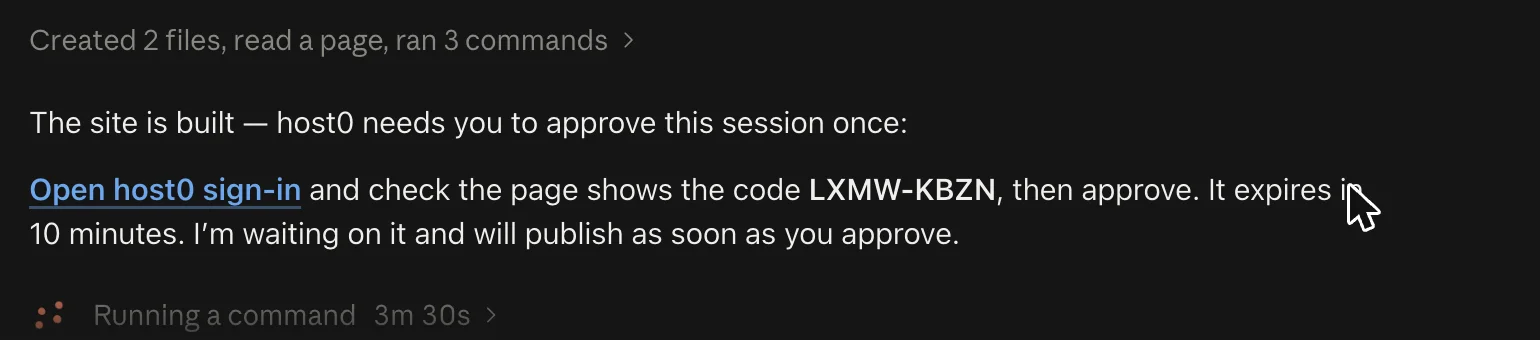
Source: claude.ai, 11 Oct 2026
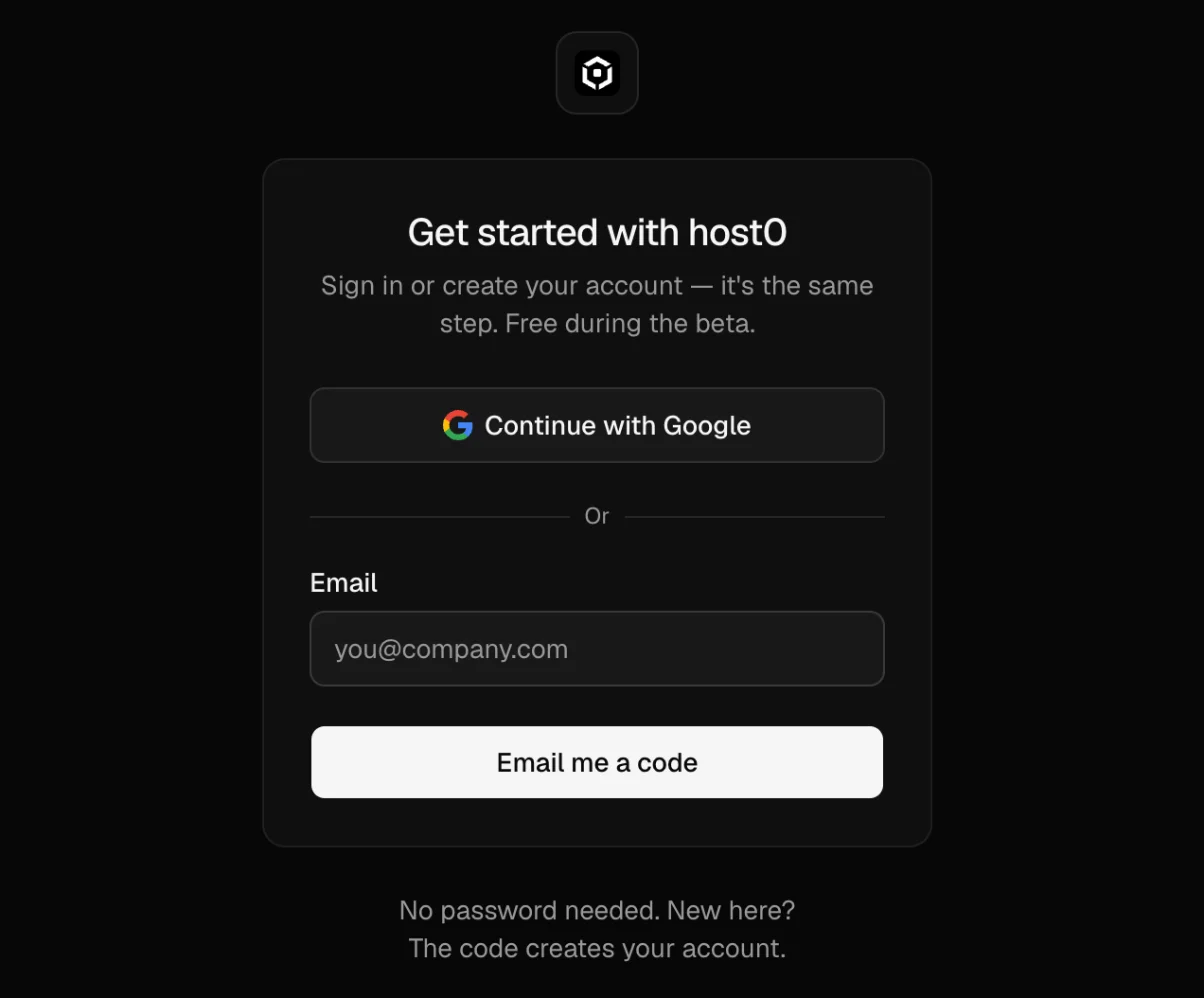
Click the link. It opens host0 in your own browser. Sign in with Continue with Google, or type your email and enter the 6-digit code host0 emails you. If you're new, the code creates your account; there's no password. Then check that the page shows the same code Claude did and click Approve.
Sign in to host0 in your own browser
Source: host0.ai, 11 Oct 2026
That's the only thing you do by hand. Claude is waiting for the approval and picks it up by itself. You never type an API key or your email address into the chat. Later changes in the same chat didn't ask us to approve again.
Step 4: Open your link#
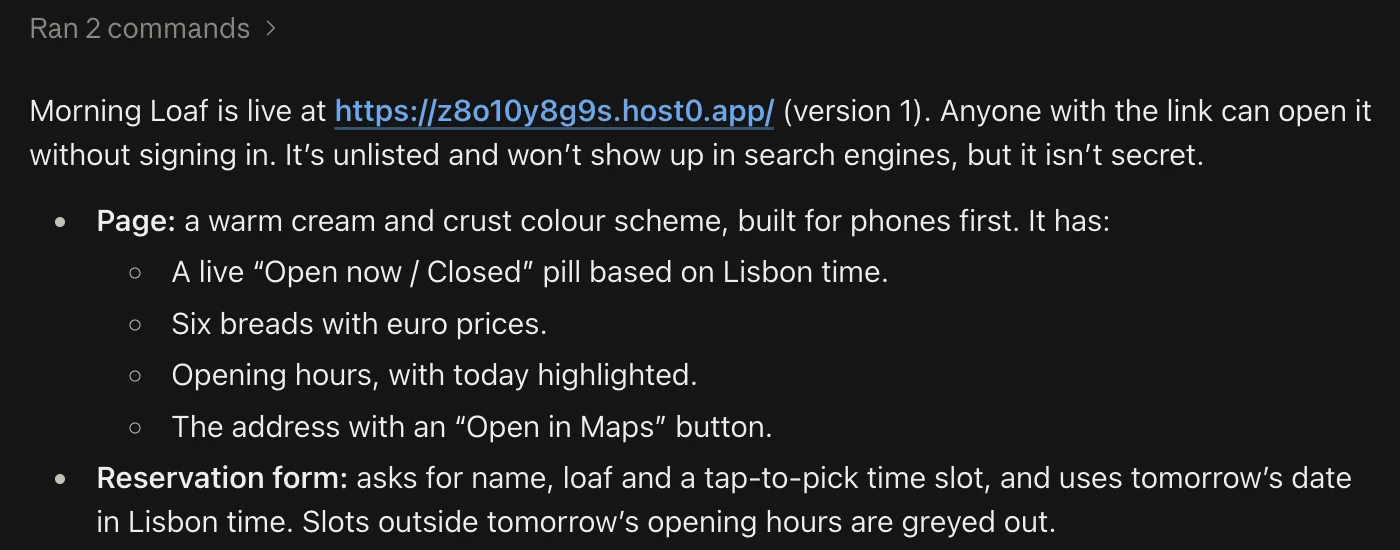
About six minutes after we sent the prompt, Claude replied with the live link:
The site is live
Source: claude.ai, 11 Oct 2026
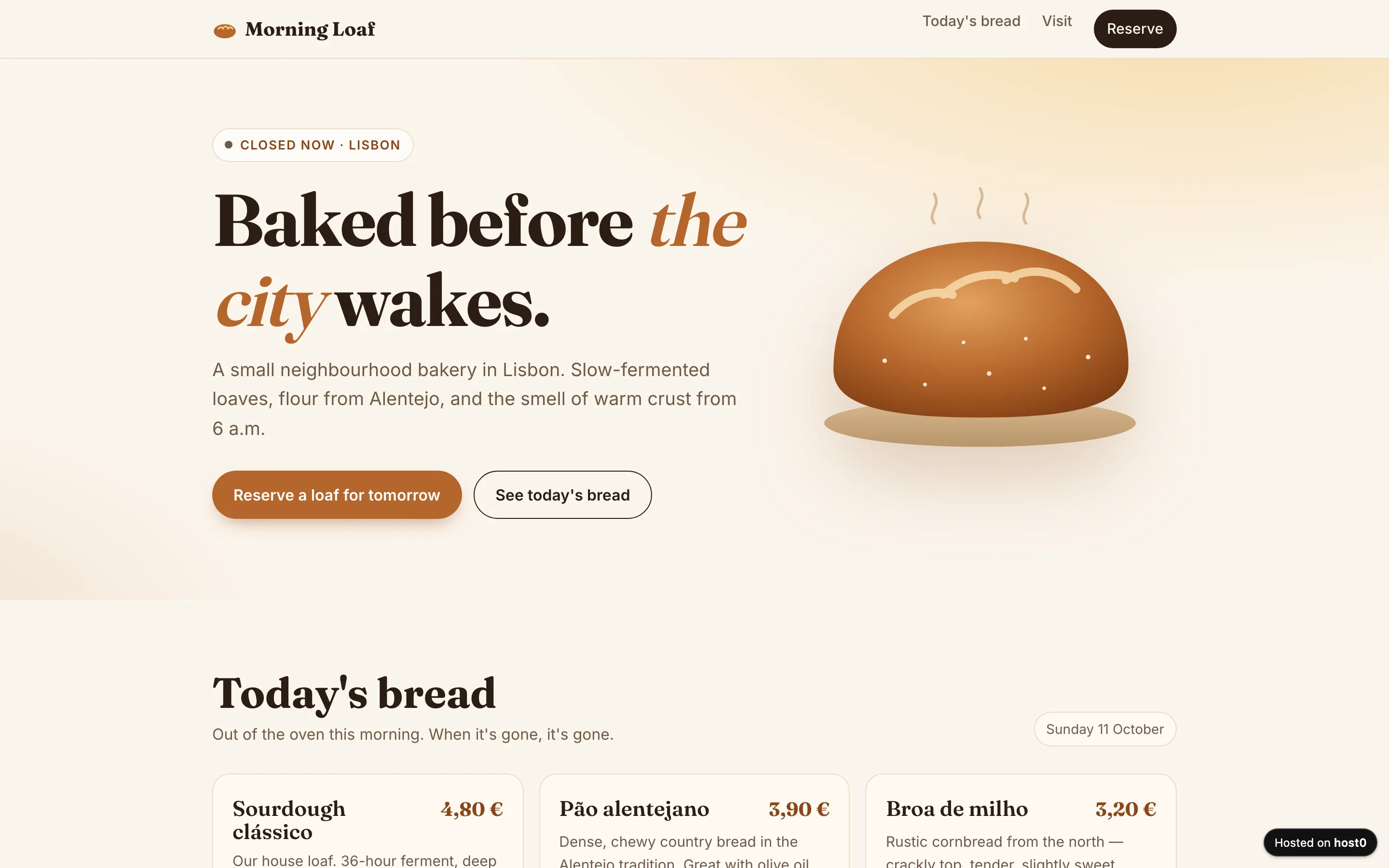
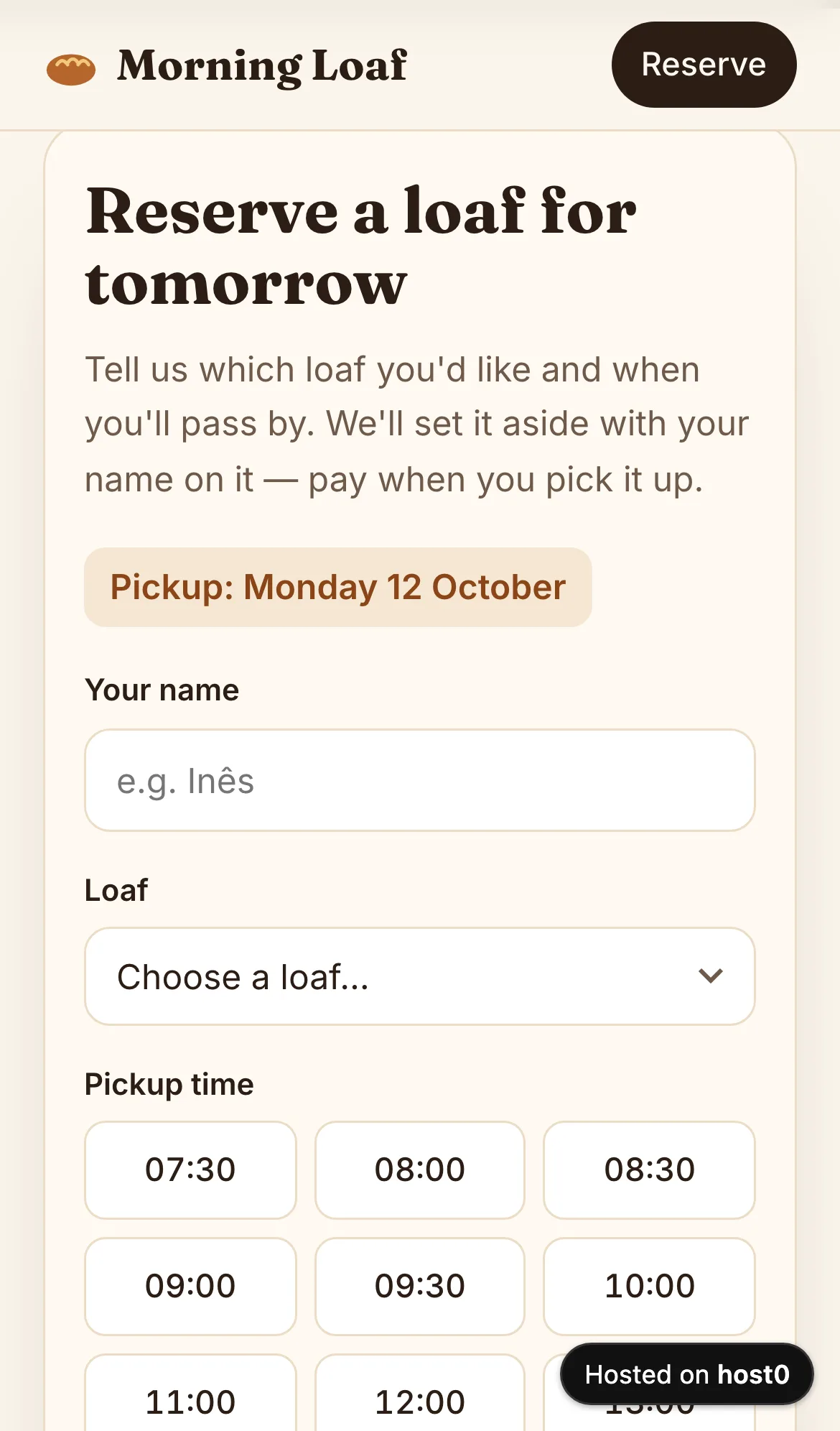
Claude went a little past the brief. It added a live "Open now / Closed" badge that works on Lisbon time wherever the visitor is, highlighted today's row in the opening hours, and turned the pickup time into a grid of buttons that greys out slots when the bakery is closed. It also told us that the address (Rua da Rosa 148, in Bairro Alto), the six breads, their prices and the hours were placeholders it had made up, which is worth checking for on your own site before you share it.
Morning Loaf on a laptop
Source: morning-loaf.host0.app, 11 Oct 2026
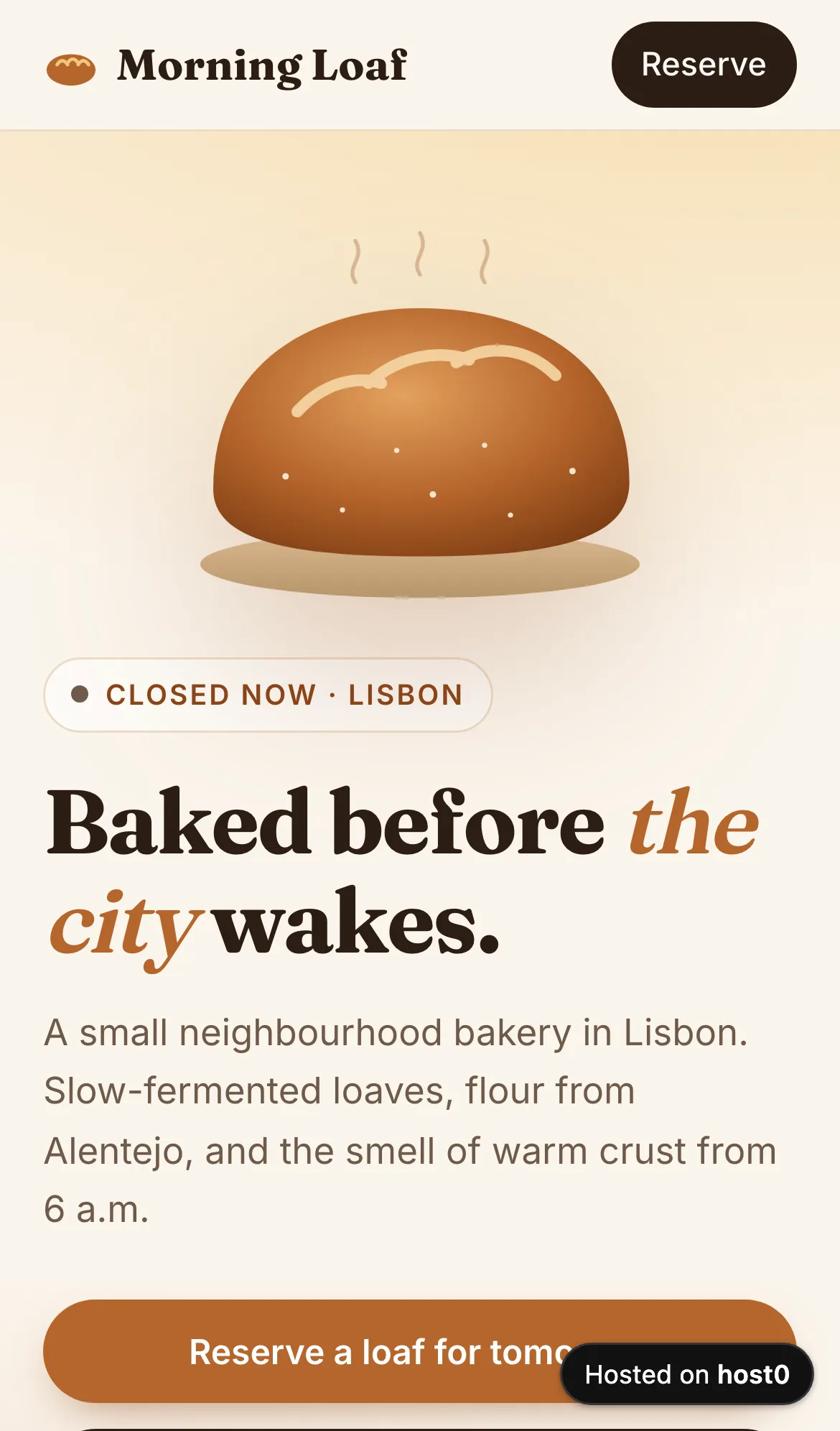
We'd asked for "good on a phone", and it is: the loaf moves above the headline, the buttons go full width, and the time slots are big enough to tap.
And on a phone
Source: morning-loaf.host0.app, 11 Oct 2026
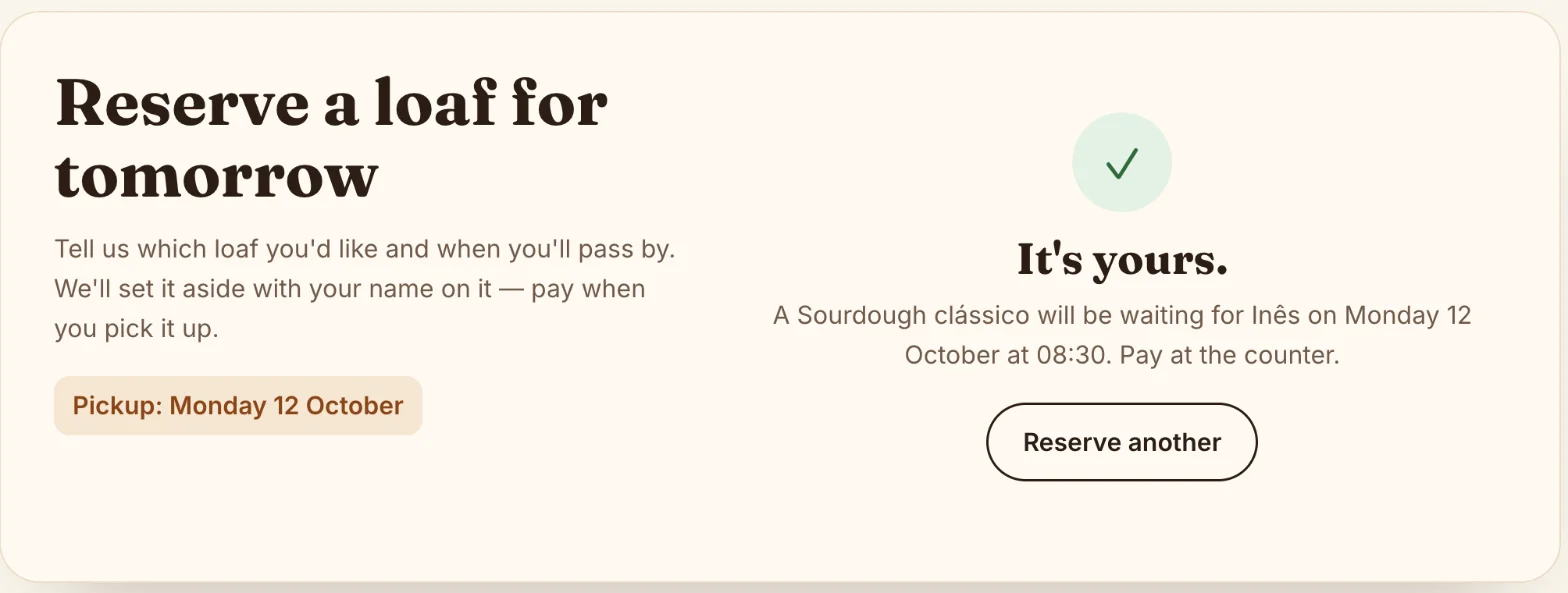
Then we filled in the form as a customer would: Inês, a Sourdough clássico, Monday 12 October at 08:30.
A reservation, saved
Source: morning-loaf.host0.app, 11 Oct 2026; test data
Step 5: Change it by asking#
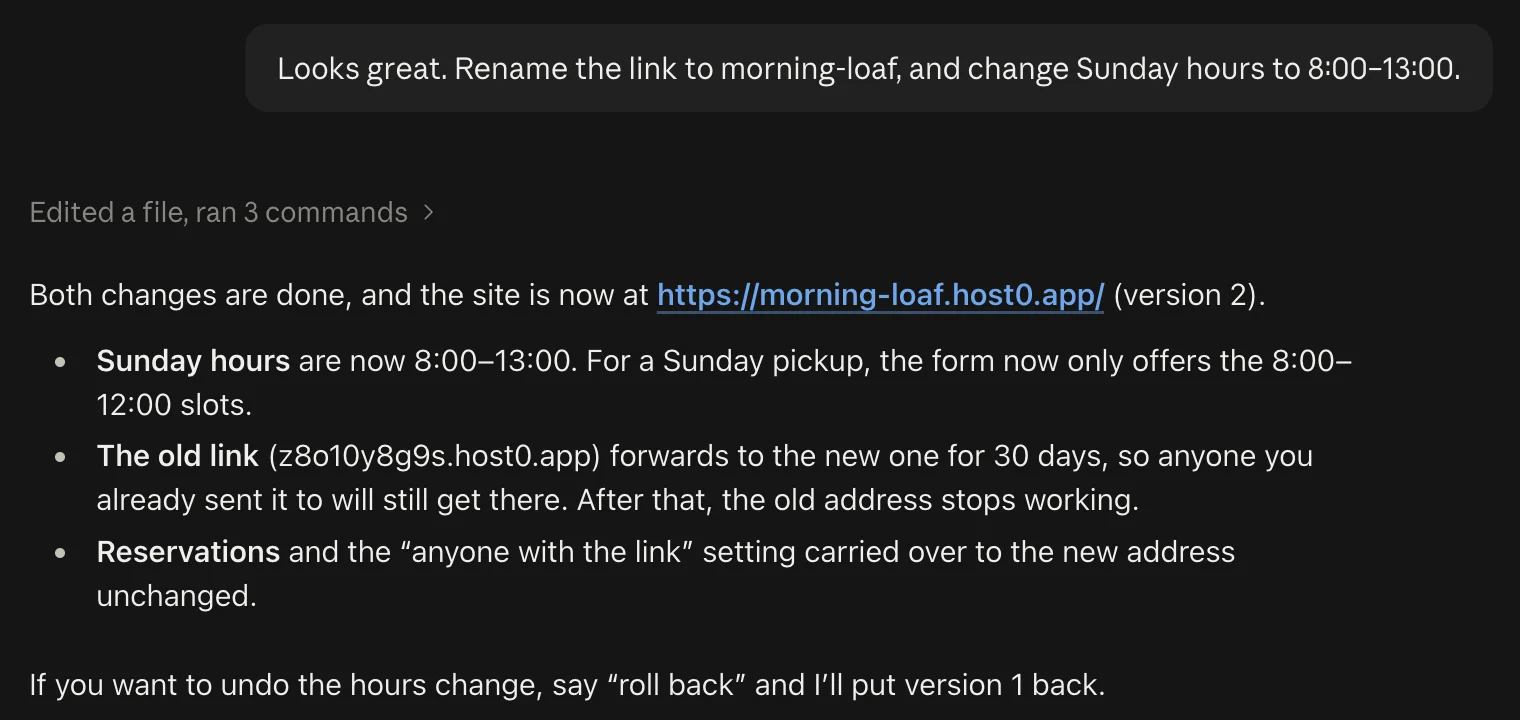
A random address like z8o10y8g9s.host0.app is fine for a first look, but not for a sign in the shop window. So we asked for a readable name and a change to the opening hours, in the same chat:
Looks great. Rename the link to morning-loaf, and change Sunday hours to 8:00–13:00.About a minute and a half later:
Rename and edit in one message
Source: claude.ai, 11 Oct 2026
Three things happened there that you'd otherwise have to handle yourself:
- The address changed without breaking the old one. Anyone you'd already sent
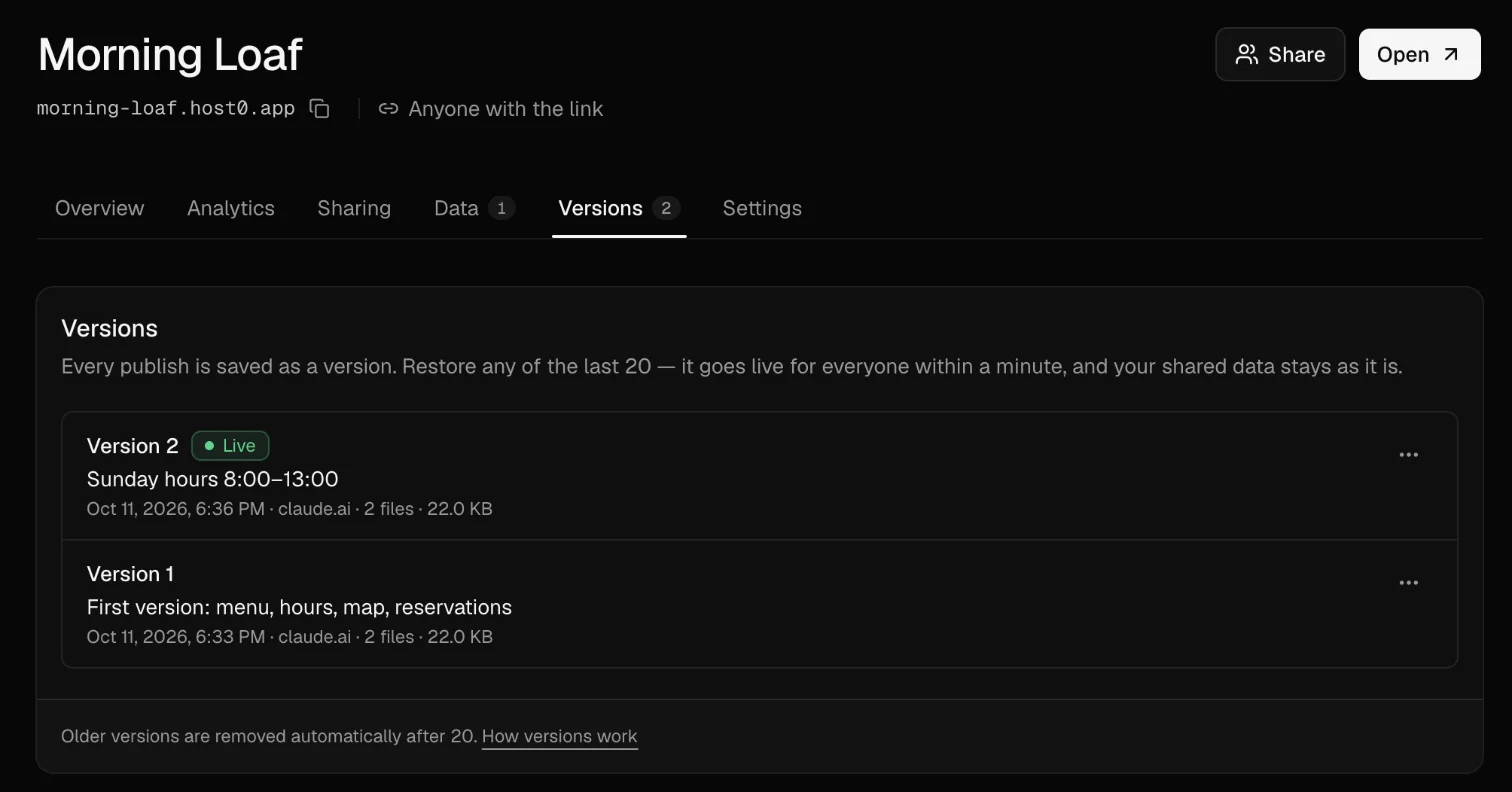
z8o10y8g9s.host0.appto is forwarded tomorning-loaf.host0.appfor 30 days. - The edit became a new version. Every publish is numbered, so "roll back" puts version 1 back as a new version and nothing is lost. host0 keeps the last 20 (how versions work).
- The data stayed put. Inês's reservation and the "anyone with the link" setting carried over.
The same goes for anything else: "add a gluten-free section", "make it private again", "put the form above the menu". Claude edits the files and publishes the next version to the same link.
Step 6: See your reservations and visitors#
Everything Claude published also lands in your host0 dashboard. Open host0.ai/dashboard and pick the site.
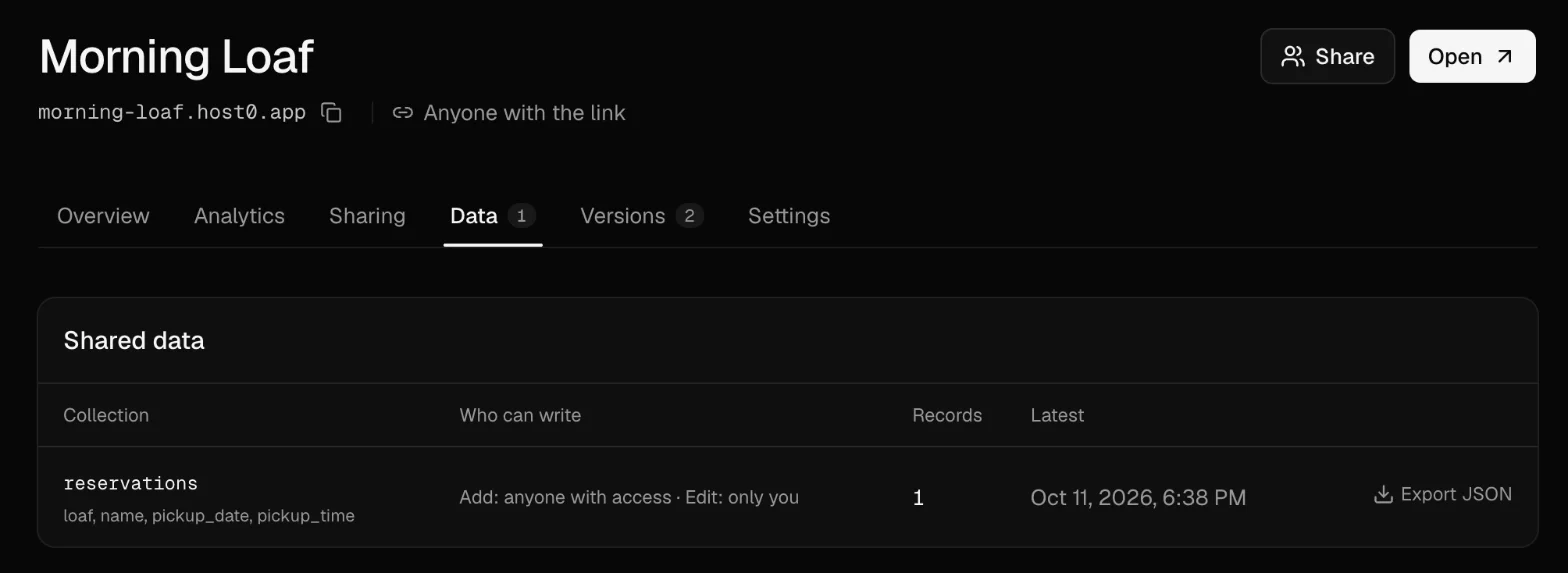
The Data tab lists what the site has saved. Ours had one collection, reservations, with the four fields the form sends, one record, and an Export JSON button. Claude had set it so anyone who can open the site can add a reservation but only the owner can read or change them, and it checked that a signed-out request for the list is refused. That matters: a booking form whose entries anyone could read would leak every customer's name.
The Data tab
Source: host0 dashboard, 11 Oct 2026; test data
The Versions tab lists every publish with the note Claude wrote for it, the time, and where it came from. Each one has a Restore option in its menu, if you'd rather click than ask.
The Versions tab
Source: host0 dashboard, 11 Oct 2026
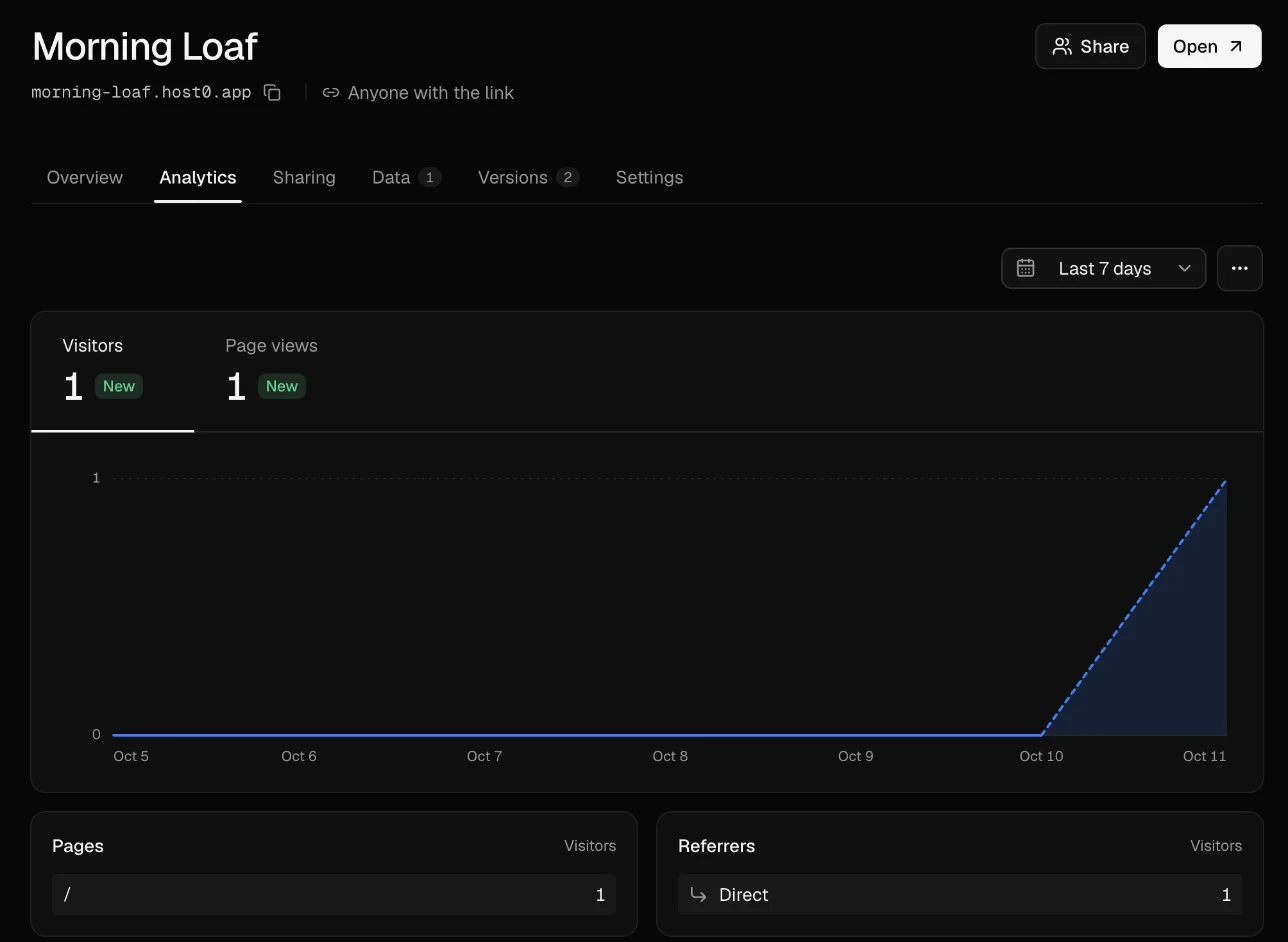
The Analytics tab shows visitors and page views over time, which pages they opened, where they came from, their countries and their devices. It's counted without cookies, and it's on for every site with nothing to set up.
The Analytics tab
Source: host0 dashboard, 11 Oct 2026
Claude's own sharing vs a host0 link#
Claude can share what it makes without any other service, and for a page you want a few colleagues to look at, that may be all you need. But the rules changed on 16 September 2026. Anthropic's help center now calls artifacts made in a chat before that date "legacy", and its sharing guide says that for everything newer, "Everyone needs a Claude account. People without one can't open a shared artifact, even with the link." The only exception is a legacy artifact published from a chat. Many of the guides we found for this topic were written before the change and still say viewers don't need an account.
Sharing a Claude artifact vs publishing to a host0 link
Artifacts made in claude.ai since 16 Sep 2026; from Anthropic's help center, checked 11 Oct 2026
Sources: Claude Help: Publish and share artifacts; Claude Help: What are artifacts; host0 docs
A few details from Anthropic's pages matter if you do share from Claude:
- Artifacts that use Claude or your connected apps can't use "Anyone with the link", the sharing guide says, and invited people from outside your organization lose the parts that use Claude or connectors.
- Shared chat attachments go with it. "When you share an artifact made in a chat, viewers also get access to the attachments and files in that chat," per the same page.
- Storage is real, with limits. Anthropic says artifacts on Pro and up can keep personal or shared data, where "Everyone sees and works with the same data", capped at "20 MB… text only". AI features in a shared artifact run on each viewer's own plan.
- Unpublishing a legacy artifact is final. You can't publish it again, and unpublishing "permanently deletes any personal and shared storage data the artifact used."
- No changes from the phone apps. "You can't change sharing settings in Claude for iOS or Claude for Android."
In short: if everyone who needs the page already uses Claude, share the artifact. If it's for customers, clients, family or anyone outside Claude, or it needs its own address, a form that collects entries you can export, or numbers on who opened it, publish it.
Other ways to host a site Claude made#
You can also download the files from Claude and upload them somewhere yourself. These are the common choices, as each one describes itself (checked 11 October 2026):
- Netlify Drop: drag the folder onto app.netlify.com/drop. If you drop it without signing in, "your project URL is protected with a temporary password until you claim it". Netlify's Claude guide notes that a React artifact has to be scaffolded into a Vite project and built first.
- GitHub Pages: free for public repositories, so your code is public. GitHub says it isn't for running "your online business" or e-commerce.
- Vercel: takes a zip, or a design sent straight from Claude Design. The free Hobby plan is "non-commercial, personal use only".
- Cloudflare Pages: Direct Upload takes "a zip file or single folder of assets" by drag and drop; choose it and you can't switch the project to Git later.
- tiiny.host: upload a file or zip. The free plan is one site, uploads up to 3 MB and 5,000 visits a month, with a small Tiiny banner.
- Static.app: paste an artifact's public link into "Import from URL", or upload a zip. There's no free plan: a 7-day trial, then from $5 a month. Since new Claude share links need a Claude account to open, the import is most likely to work with legacy published artifacts.
All of these are solid hosts. The difference is the round trip: you copy files out of Claude, upload them, and come back to Claude for every change. Publishing from the chat skips that, and keeps the form's data, the versions and the visitor numbers in one place.
Troubleshooting#
Claude says it can't reach host0.ai or host0.app. Network egress is off, or the domain isn't allowed. The host0 skill tells Claude to stop and name the domain to allow when every request fails with a connection, proxy or SSL error, rather than retrying forever. Go to Settings → Capabilities, turn on Allow network egress, and choose All domains or add host0.ai and host0.app. On a Team or Enterprise plan, ask an owner. Then say "try again" in the same chat; Claude still has the files. (An occasional single hiccup is normal in Claude's sandbox and is retried automatically.)
Claude made the page but didn't publish it. Check that Cloud code execution and file creation is on, and that your prompt asks Claude to publish it with host0 and includes the https://host0.ai/skill.md link. Then ask: "Now publish it with host0: follow https://host0.ai/skill.md."
The sign-in link expired. The code is valid for 10 minutes. Tell Claude "the link expired, start again"; it shows a new link and a new code.
The code on the host0 page doesn't match. Don't approve it. Approving gives whoever started that sign-in the right to publish to your account. Close the page and ask Claude for a fresh link.
People are asked to sign in when they open the link. The site is private, which is the default when you don't say otherwise. Tell Claude "make the link open for anyone who has it", or change it on the Sharing tab of the dashboard. To let only certain people in, keep it private and invite their emails there.
FAQ#
Can Claude host my website?#
Not at an address of its own. Claude can show and share a page as an artifact on claude.ai, but Anthropic's Claude Code docs describe an artifact as "one self-contained page with no backend" and say: "For a hosted internal tool with a backend, deploy it on your own infrastructure instead." To get a real website, Claude has to publish the files to a host, which it can do from the chat as shown above.
Do people need a Claude account to open my site?#
Not on a host0 link set to "anyone with the link": it's a normal website. For an artifact shared from claude.ai, yes, since 16 September 2026, unless it's a legacy artifact published from a chat, per Anthropic. Artifacts published from Claude Code are an exception: its docs say a public link opens "with no claude.ai sign-in required" (on Team and Enterprise, only once an owner allows it).
Can I do this on Claude's free plan?#
Anthropic says code execution is available on every plan, Free included, and the network egress switch sits in the same settings on Free, Pro and Max. host0 is free during the beta. Whether Free can share a new artifact by link inside Claude is unclear: Anthropic's sharing guide says it can't, while its artifacts page and Docs guide say Free can share with anyone who has the link.
Do I need to install the host0 skill?#
No. Put https://host0.ai/skill.md in your prompt and Claude reads it, as it did in our test. Claude also supports installing skills under Customize → Skills by uploading a ZIP, but you don't need to for this.
Can a website built in Claude save form entries?#
Yes, if the host gives it somewhere to save them. On host0, Claude adds an h0.json file declaring each collection, its fields and who can read, add or change records, and the page saves to its own address. You read and export the records from the dashboard's Data tab (how shared data works). Inside Claude, artifacts on Pro and up have their own storage, which only works on claude.ai.
Can I use my own domain?#
On host0 you can rename the link to something readable, like morning-loaf.host0.app; your own domain isn't available yet. For Claude artifacts, Anthropic's help pages describe no custom-domain option.
Who can see my site?#
New host0 sites are private: only you and the emails you invite. "Anyone with the link" opens it to anyone with the address, unlisted and kept out of search engines, but it can be forwarded, so don't use it for anything sensitive. "Public on the web" lets search engines list it, for a site you want people to find; you turn that on in the dashboard (the three settings).
Can I edit the site later?#
Yes. In the same chat, ask for the change and Claude publishes a new version to the same link. Every version is kept (the last 20), and you can restore any of them from the Versions tab or by asking Claude to roll back.
What does it cost?#
host0 is free during the beta; paid plans may come later, with notice. Sites carry a small "Hosted on host0" badge in the bottom-right corner.
How we tested this#
We ran everything above on 11 October 2026 in claude.ai on the web, in a fresh chat with Claude Opus 5.5, signed in to our own host0 account, and took every screenshot from that run. Morning Loaf is made up, and so are its address, menu, prices and hours (Claude said so itself); the one reservation is test data. Times are from the run: about six minutes from sending the prompt to the live link, including a minute or two to sign in and approve, and about a minute and a half for the rename and edit. Anthropic's rules for artifacts, sharing, storage and network access come from its help center and Claude Code docs, re-read the same day and linked inline; where they don't mention something, we say "none described" rather than guess. The other hosts' details come from their own pages.
host0 exists for this last step: whatever your agent made, a link you can share, with a database that just works. Start from the agents page or paste the prompt above into Claude.